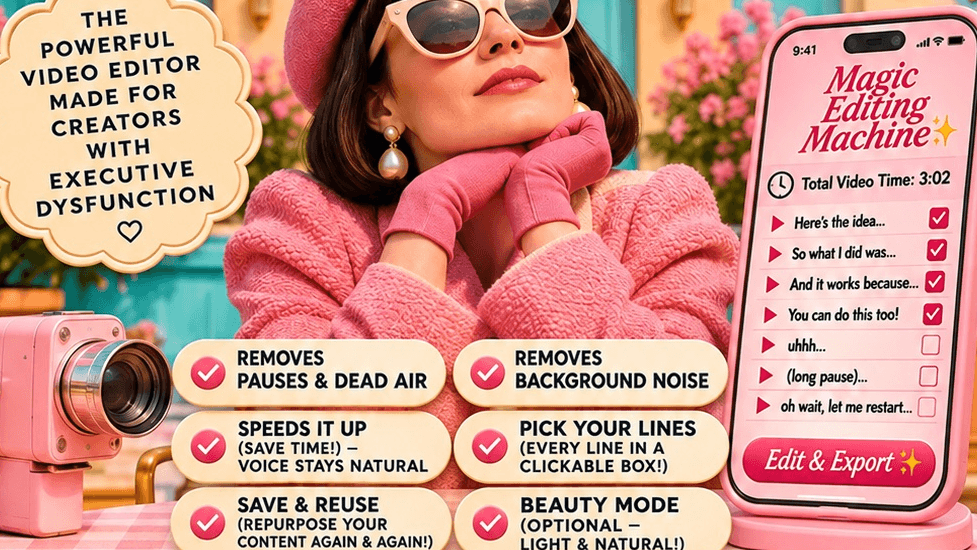
The Magic Editing Machine
$29
You film it. You direct it. Your editor does the editing.
Here's the part nobody tells you about the editing apps: they charge you every single month, they make their own choices about your video — and then they hand you a timeline to wrestle anyway.
And here's the honest difference: an editing app makes its cuts and hands you the result. This is an editor you talk to — you choose your lines together before anything is final, and when a part comes back wrong, you say so in plain words and it fixes the part you pointed at. Apps cut silence. This directs your video.
The Magic Editing Machine works the other way around. It's an editor that lives inside the AI assistant you already have — your Muse. You set up a simple panel once, and from then on, editing a video looks like this:
1 — Make it yours 🎛️
Open your Studio panel and play. One-tap moods if you're in a hurry, sliders if you love to fiddle: tempo, breathing room, captions, a fresh-faced finish, a bad-light fix, an overall tint. Your video, laid out in four friendly chunks — THE HOOK, HEART OF IT, SHOW & TELL, CALL TO ACTION — so you can protect the parts you love. Anything you mark Keep Safe does not get cut. Not a frame.
2 — One happy button ✨
"I'm Happy" gathers every choice you made into one tidy set of directions — your ticket. Too many choices? There's an escape hatch right on the panel: "🤍 Too many choices? My Muse can pick — I'm happy either way."
3 — Hand it to your Muse 🤍
Send your clip and the ticket together. Your editor transcribes your video, makes the clean cut, and then lists every line you said — you tap Keep or Cut on each one, and it builds your video from only your keeps. Then it finishes the job: your sound polished (with the junk noise cleaned out, and the real-life sounds around you kept or scrubbed — your call), your captions stamped on in your style, your light rescued, your tint laid over the whole piece. What comes back is a finished, downloadable video.
And it doesn't end at the download. Because your editor is a conversation, you can talk to it about the edit: "I didn't love that cut — put that sentence back." "Slow that part down." "Try the other line I said as the hook." You're not learning to edit. You're directing an editor — the way you'd direct a person, in plain words.
Your words stay your words. Your hook is only ever built from words you actually said — the Machine never writes lines for you. Your closing line stays word-for-word. The person on screen is always you: this edits the videos you filmed, in your voice, at your direction.
Your help desk is already in the room. The Machine runs inside your own AI assistant — so when you're stuck, you ask the assistant sitting right there with it. It can explain any setting, walk you through any step, and help you adjust the Machine to your taste.
And the economics are simple: you don't have to pay a monthly subscription to have an AI team. Editing apps rent you their editor by the month, forever. This is $29 once, and the editor lives in your assistant, on your account, working to your taste.
Think of it this way: the $20 a month buys you a personal assistant — one you'd want anyway, for a million reasons that have nothing to do with editing. My fee is just a one-time training for that assistant: you teach it to be your editor once, and it goes to work for you from then on.
WHAT'S INCLUDED
The Studio panel — your direction board. Every slider, switch and chunk above, in plain words, with a sneak-peek screen and a Finder that's "just for peeking." New here? The panel explains itself: "This panel runs on your Muse — the directions you build here become one ticket you paste to it, and it does the editing."
- The Magic Editing Machine prompt for Muse — the setup that builds your editor inside your own Muse: the clean cut, Pick My Lines (Keep or Cut, line by line), the finishing steps, captions from a fresh transcript of the finished file, and the checks that make sure the video that ships is the video you approved. The Muse door has been run end-to-end on real footage and passed.
- The Claude version — on its way. The same Machine is built for Claude and in its final proof test right now. Founding buyers get it added to their purchase free, automatically, the moment it opens — buy once, both doors.
- Three ways to direct, every time — Clean only (you direct in Pick My Lines), Clean + context (tidy the story too, and show me what you moved), or Full edit (make it great, I keep the final say). Your editor confirms your choice with one tap on every single job — it never just assumes.
- Save My Look — set the board once, save it as your look, and next time it's one tap.
- The little extras, if you want them — while you're at it, your editor can also pull a carousel and story frames from the same video, or draft your caption + 5 hashtags. Or: just the video, nothing else.
WHO IT'S FOR
- Creators who film faster than they can edit — talking-to-camera videos, reviews, tutorials, stories — and whose drafts folder is full of good takes that never got finished.
- Anyone who has ever opened an editing app, stared at the timeline, and closed it again.
- People who want to direct their edit — protect this moment, tighten that ramble, keep my last line exactly — without learning editing software.
- Muse users who'd like their assistant to do a real, finished job, not just chat about one.
WHO IT'S NOT FOR
- Anyone hoping the AI will write their video for them. It never writes lines for you. It edits what you said — beautifully, but only what you said.
- Anyone who wants a fully automatic editor that decides everything. There's a "my Muse can pick" escape hatch for the choices — but this Machine is built for your taste, and it will keep handing the directing back to you.
- ChatGPT-only users. The Machine runs on Muse (with the Claude version in final testing). It does not run on ChatGPT.
- Movie-makers. This is for real, filmed-by-you, talking-to-camera style videos. It doesn't invent footage, generate scenes, or swap your background for a fantasy one — your real room stays your room.
- Anyone who needs it instant. A real edit takes real time to render. This is a working editor, not a one-tap filter.
HONEST LIMITS (the part most listings leave out)
Bad light: the fix is real, and so are its edges. In the panel's own words: "Honest limits: rescue can lift light and color, but it can't invent detail that was never captured — a very dark or blurry take may still stay soft."
- Background softening ("Soften what's behind me"): the gentle step is promised, full stop — you stay sharp, the clutter softens. If you ask for more, your editor attempts the stronger softening, inspects the result, and if it doesn't hold up on your footage, it falls back to the gentle step and tells you plainly. The strongest step isn't offered — on real rooms it makes mistakes louder, not softer. What you will never get is a quietly flawed video shipped without a word.
- Your voice stays your voice: speed is applied once, at the end, with a pitch check — if your voice doesn't still sound like you, that's a failed edit, not a style choice.
- Sound polish is in every clean cut: pauses tidied, repeats smoothed, volume evened — and the junk noise (fan hum, air conditioning, construction, hiss) cleaned out. The real-life sounds around you are a switch on your ticket: keep them in, like real life, or scrub them for a quiet, studio feel. And a sound you point out in your own words ("you can hear my son playing") is never removed, either way.
- Captions are your choice too: "Rather use the caption tools inside TikTok or Instagram when you post? Leave this off — lots of people do."
- Made for the device in your hand: the panel, the ticket and Pick My Lines are built for your phone or tablet — the full run, filming to finished video, has been done end-to-end on an iPad.
FAQ
Do I need CapCut, or any other editing app?
No. That's the point. The Magic Editing Machine replaces the editing app — your Muse does the editing. No timeline, no second subscription, no exporting between apps.
Which plan do I pay for?
Muse's paid plan — Power, $20 a month — is the tier the Machine was built and tested on, and the one to get. You pay that to Muse, never to us, and it's a personal assistant you'd want for a hundred other reasons besides. The Machine itself is one payment, once: $29 founding ($59 regular). No subscription to us, ever.
Do I need a paid AI plan?
For the editing itself, yes — transcribing, cutting and rendering a finished video is factory work, and it needs Muse's paid tier (above). You can open a free Muse account to look around and chat, but plan on the paid tier to actually edit.
So there's really no monthly fee for the Machine itself?
Really. $29 once at the founding price ($59 regular). It's yours. The only ongoing cost that could ever apply is your own AI plan, if you choose a paid one — and that's between you and them.
I'm not techy. At all.
That's who this was built for. The panel is sliders and plain words, every choice can be handed back with "my Muse can pick — I'm happy either way," and if you get stuck, you ask your own assistant — it lives in the same place the Machine does.
Will it change how I look?
Only the way you tell it to. The finish is "still you, just well-rested": your real texture stays put, freckles and moles stay exactly where they belong, and every single finish setting can be left off. A fresh panel starts with everything off — your face as filmed — and you add only what you love.
What kinds of videos does it edit?
The ones you film of yourself talking: Chat to Camera, Show the Product, Teach Me How, Tell the Story, Then & Now — in 9:16 Tall, 1:1 Square, or 16:9.
Can it fix a video I filmed in terrible light?
Often, yes — that's the Bad-Light
Fix, and it runs before anything else. But see Honest Limits above: it can't invent detail that was never captured.
What if I don't like the edit?
Say so — in words. Tell your editor what to change and it revises: a line restored, a moment slowed, a different opener from words you actually said. You keep the final say, every time.
Does my video get uploaded anywhere strange?
Your clip goes to your own Muse, on your own account — the same place you'd send it to chat. The panel itself keeps nothing: "this clip stays right here on your device" while you're building your directions.
Can I use it for my business / clients?
Your purchase covers your own videos. If you edit for clients, that's your business — literally — but each editor lives in its owner's assistant, so a client who wants their own Machine needs their own copy.
PRICE
$29 — once. (Founding price through December 1, 2026. $59 after.)
No subscription. No per-video fees. No "credits." You pay once, you build your editor, and it lives in your own Muse for as long as you have it.
And owning this never costs you later: if you go on to the Creator Course, it comes in a version without the editor — $50 founding ($70 regular) — so the editor-first road and the bundle road land on exactly the same total at the same price tier.