TL;DR
Instead of saving posts to an Instagram folder and hoping you’ll revisit them, you can DM them directly to @StanleyForIG. Stanley will store your inspiration, break down why it worked, and help you recreate it in your own voice using what it already knows about your Instagram account, audience, and niche. It takes less than a minute to set up—and it’s the fastest way to turn inspiration into your own content.
If you’re like most Creators, you spend hours each week scrolling your feed for inspiration. And when you come across a post you like, you hit ‘Save’ and tell yourself you’ll come back to it later.
But then you never look at it again 🫣 Sound familiar?
Don’t worry—it’s not just you. But there’s a better way to turn inspiration into content you’ll actually post.
It all starts with Stanley—your AI Head of Content. Instead of saving posts to an Instagram folder, you can DM Stanley Reels and carousel posts directly from your Instagram account and make them yours in just a few clicks.
It’s a simple shift that can get your inspiration out of the saved folder graveyard and into your feed.
Here’s why you should be DMing Stanley posts to replicate, how it works, and ways you can use it day-to-day to grow on Instagram.
The Problem With Saving Instagram Posts
Your Instagram saved folders are where great content ideas go to die. That might sound dramatic, but the reality is many Creators pour a lot of time and energy into saving posts, yet little to no time actually revisiting them.
Even if you do return to recreate your saved posts, it’s hard to act on them quickly. There’s still a massive gap between turning that inspiration into a post that feels aligned with your brand.
And when it comes to jumping on trends you’ve saved, if you don’t act quickly enough, they become overdone or irrelevant. So most posts just sit there, buried under everything else you’ve saved before.
What you need is an easy way to turn those saves into actual posts—a tool like Stanley Instagram.
What’s Stanley Instagram?
Stanley is the AI Head of Content built specifically for Instagram Creators, by Creators.

Unlike whatever generic AI tools you might be using, like ChatGPT, Stanley connects directly to your Instagram account—so it already has context on:
- Your past posts
- Your performance data
- Your audience
- And who you are as a Creator
Every single one of Stanley’s features is designed to help Creators like you build your audience faster. That means creating features to streamline the parts of your workflow that are holding you back—like finding inspiration or turning ideas into top-performing content.
That’s why we built Stanley’s saved feature.
Why You Should DM Stanley Posts You Want to Replicate
Stanley will help you make sure the posts you’re inspired by actually end up on your feed, instead of rotting in a folder you’ll never open.
No more saving posts to an Instagram folder and hoping you’ll revisit them—you can send posts directly to @StanleyForIG on Instagram.
Stanley will save them, break them down, and turn them into content ideas tailored to your brand and niche—then help you turn those ideas into scripted content that actually sounds like you (not a robot).
And you don’t have to spend time figuring out how to make the post go viral. Stanley will dig into the data to translate what worked for that Creator into content that’ll perform for your specific audience, too.
How to Set Up Stanley DMs in 30 Seconds
Stanley’s saved feature takes less than a minute to set up and can save you hours. Here’s how to do it.
1. Open your Stanley app
You can use the Stanley mobile app or desktop version, but we recommend mobile for the smoothest experience (plus access to our latest features!)

2. Copy your unique connection code

Grab your special code by navigating to the left-hand menu, clicking Saved, and then selecting Enable DM access.
From there, click the Copy button and open Instagram.
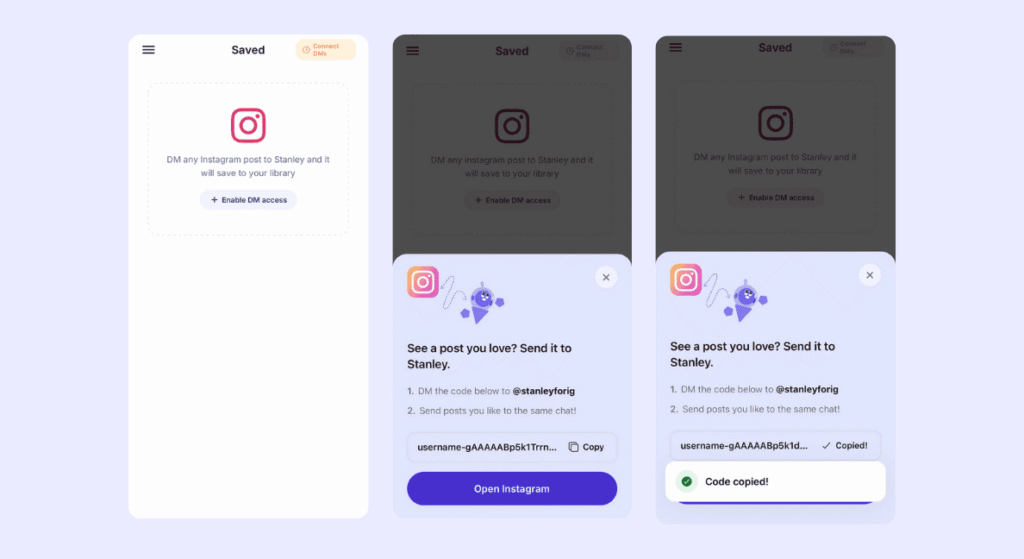
3. DM your code to @StanleyforIG on Instagram
When you click Open Instagram, you’ll be taken to the @StanleyForIG Instagram account. All you need to do is click Message and paste your unique code into the chat.
Hit send, and that’s it! You can start sending Stanley content instantly.
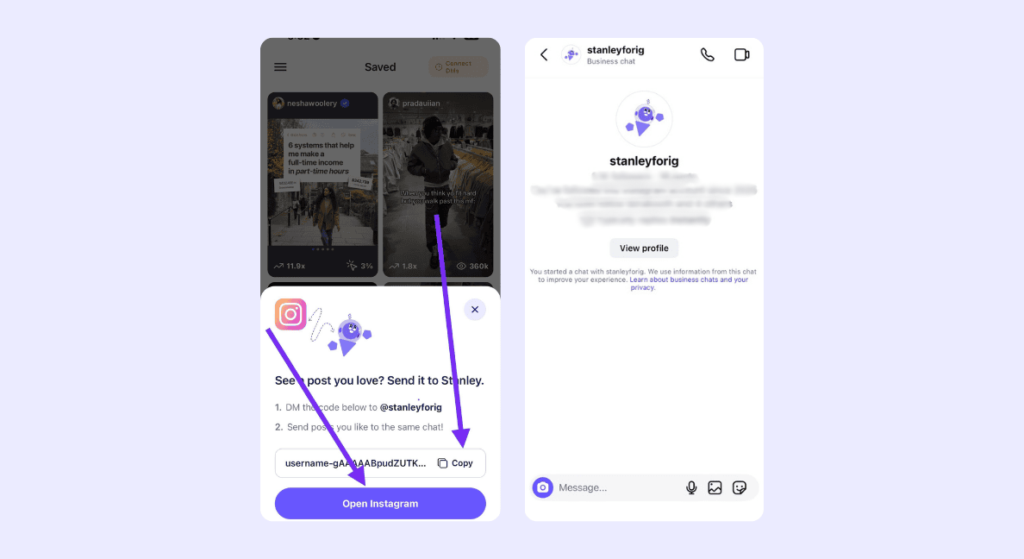
How to Use Stanley DMs Day-to-Day
Once you’ve set up the saved feature, you can start sending Stanley posts you like. Here’s how to fit it into your creative workflow.
Save Posts
Instead of saving posts you like to an Instagram folder, send them to Stanley.
You can DM Stanley when you see:
- Reels that are performing well in your niche
- Carousel formats you want to try
- Audio or visual hooks you want to remember
- Or trends you want to make your own

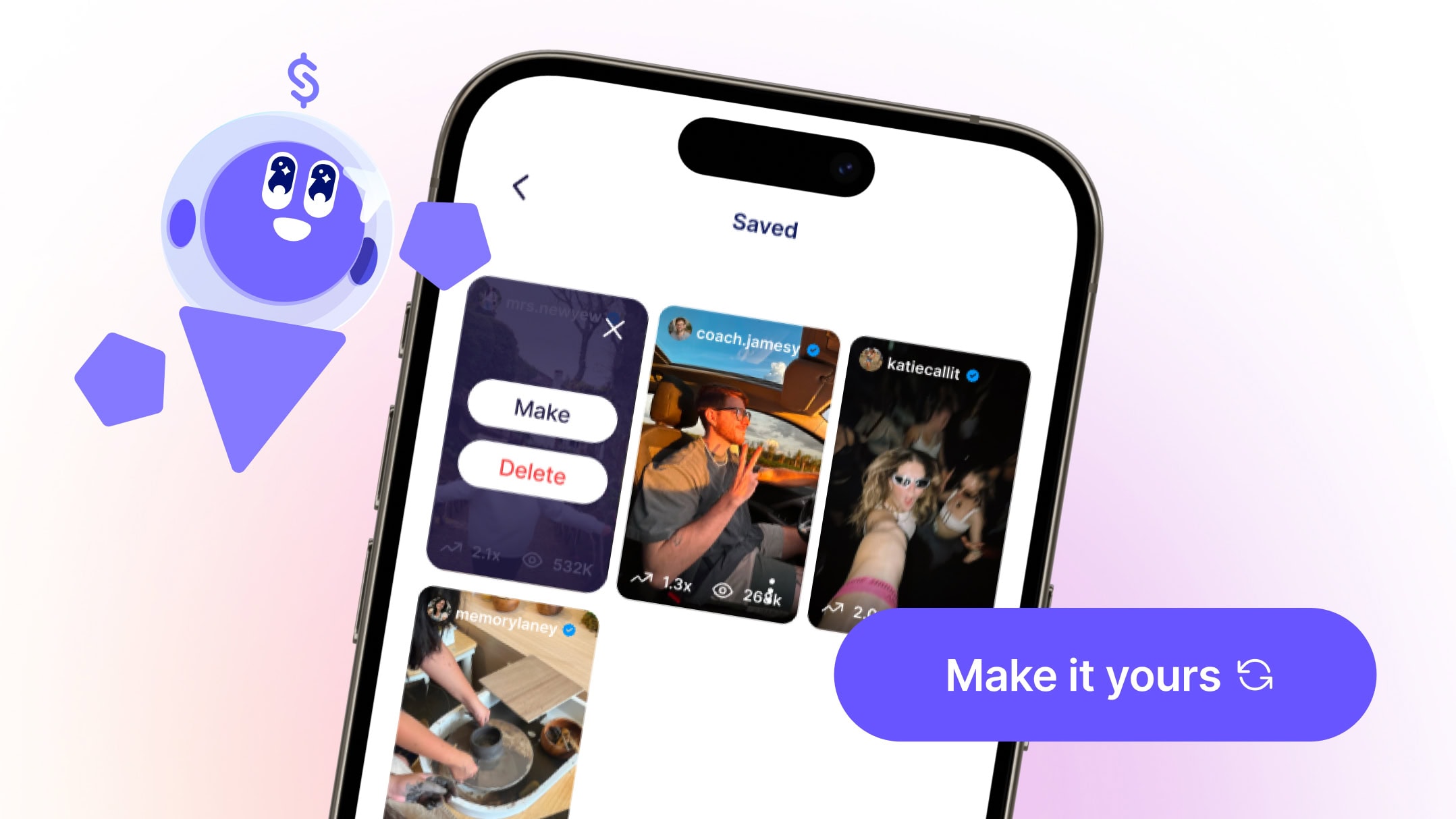
Stanley will store everything you send inside the Saved tab of your Stanley app, so you don’t have to go back and forth between Stanley and Instagram.
Tired of spending hours each week scrolling your feed for inspiration? Stanley can do it for you. Ask Stanley for viral ideas and he’ll show you recent top-performing videos from Creators in similar niches (then help you recreate them).
Learn What Works
Every time you send Stanley inspiration, it’ll analyze why it worked, reference what it knows about your account, and brainstorm unique ways you can recreate it.
So next time you’re looking for fresh content ideas—whether that’s an hour or three weeks later—you can simply navigate to the Saved folder of your Stanley app and get a personalized breakdown of each video.
Turn Concepts Into Content
When you’re ready to create, you can open Stanley and scroll through the posts you’ve sent. Then, just choose the one you want to recreate and tap “Make it Yours.”
Stanley will take the content— the format, the structure, the angle—and adapt it to your voice, your niche, and your audience.
Instead of copying the other Creator’s idea, it’ll use the post as a starting point and transform it into content that actually sounds like something you’d share.
Start Sending Stanley Your Inspiration
Your saved folder was never the problem. Acting on what’s in it was. Stanley fixes that.
Connect your Instagram to Stanley in seconds and start sending your posts to @StanleyForIG so you can quickly recreate them later.
Ready to put your content inspiration to work? Get 14 days of Stanley free and see what it can do for your Instagram growth.
FAQ: Stanley DMs
Stanley’s saved feature lets you DM posts, Reels, and trends you like directly to @StanleyForIG on Instagram. Instead of saving inspiration to a folder you’ll never open, Stanley stores it, breaks it down, and turns it into content ideas tailored to your niche, voice, and audience—all in a few taps.
Open your Stanley app, navigate to the left-hand menu, click ‘Saved,’ and select Enable DM Access. Copy your unique connection code, open Instagram, and paste it into a DM to @StanleyForIG. Once you hit send, you’re connected and can start sending Stanley content immediately.
You can send Stanley any Reel or carousel post that catches your eye: Posts performing well in your niche, ideas you want to try, hooks you want to remember, or trends you want to put your own spin on.
Everything you DM Stanley gets stored in the Saved tab of your Stanley app. You can browse your saved posts anytime and tap “Make it Yours” to see a breakdown of why each post worked and turn that inspiration into your own content.
Stanley doesn’t copy other Creators’ content. It uses the post as a starting point—studying the format, structure, and angle—then adapts it to your voice, niche, and audience using what it already knows about your Instagram account and data. It’ll turn the inspiration you share into content that feels genuinely yours—not a knockoff of someone else’s.
Yes. Every time you send Stanley a post, it digs into what made it work—the hook, the format, the pacing—and cross-references that with your own account data to figure out how to replicate that performance for your specific audience.
You can go through your existing saved posts, send the ones worth revisiting to @StanleyForIG, and let Stanley do the heavy lifting of turning them into actual content. No more scrolling through a graveyard of forgotten ideas.
Instagram’s saved folders only store posts. Stanley won’t just save posts you send it—it’ll analyze them, break down why they work, and help you make them yours. So instead of saving inspiration to a folder and hoping you’ll revisit it someday, Stanley gets you turning those ideas into your own Instagram posts.