TL;DR
Instagram Trial Reels are a low-pressure way to test content with non-followers before it ever hits your feed—so you can experiment and learn from what works. This guide breaks down what Trial Reels are, strategic ways Creators can use them to grow faster, and how Stanley Instagram can help you generate ideas, A/B test copy, and maximize your results.
Most Creators are stuck in a cycle of creating content they think will work, without really knowing what’s resonating or why.
They hit publish and hope for the best. And when it comes to trying something new, most play it safe. They’re nervous to experiment in front of their audience and lose followers, so they stick with what’s familiar.
But if you really want to grow on Instagram, you shouldn’t be blindly creating or limiting what you post. And with Instagram Trial Reels, you don’t have to.
Trial Reels let you test ideas with non-followers before your audience ever sees them. They give you real data on what works, insights to shape your strategy, and the freedom to experiment.
If you’re not using them yet, you should be. Here’s how to make Trial Reels part of your workflow—and how Stanley Instagram can help you get even more out of them.
What Are Instagram Trial Reels?
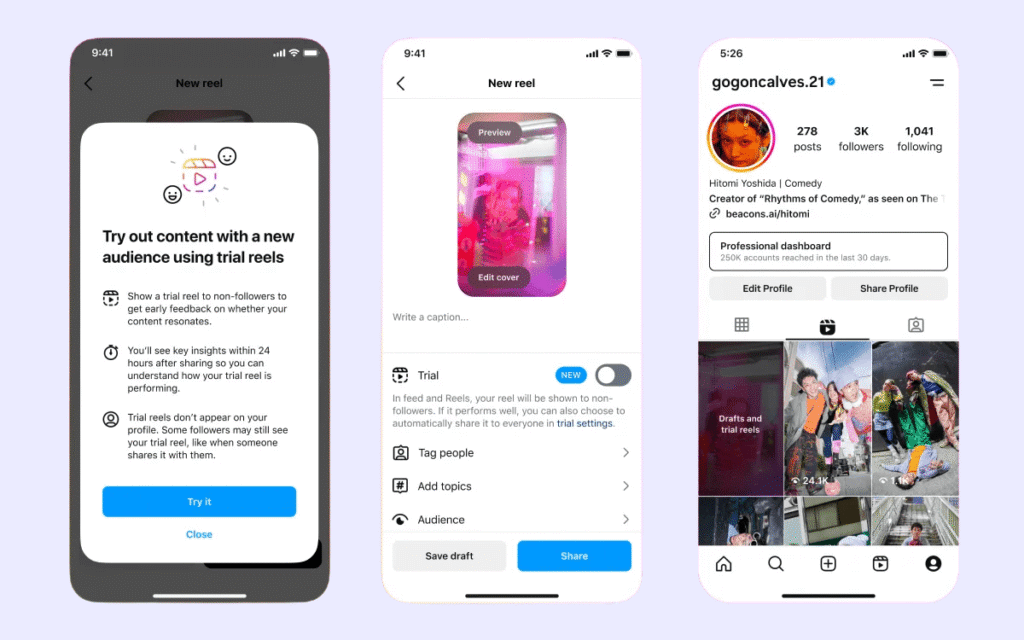
Trial Reels are exactly what they sound like: a way to test your videos with non-followers and get an early indication of how a Reel may perform before putting them in front of your audience.
Here’s how they work (and what you need to get started):
- You need a professional Instagram account (Creator or Business) with at least 1,000 followers to access Trial Reels
- Trial Reels are only shown to people who don’t follow you, but they can still be shared with your audience through DMs or Stories
- Your existing audience won’t see your Trial Reels in their feed, on your profile, or in your Reels tab unless you choose to share it with them later
- After roughly 24 hours, you’ll be able to see its performance data to help you decide whether the content is worth sharing with your audience, if you should tweak it and try again, or remove it altogether
- You can share your Reel with your followers if the Trial performs well (both automatically or manually)
Why Should You Use Instagram Trial Reels?
Trial Reels give you real feedback on your content without the pressure of your entire audience watching.
You can use them to:
- Experiment with hooks and editing styles
- Reach and attract new audiences
- A/B test copy, music, or video variations
- See how niche content lands without losing followers
- Validate trends before trying them with your audience
They’re a great way to experiment with new formats, topics, or styles and get invaluable insights to inform your Instagram strategy.
3 Strategic Ways to Use Instagram Trial Reels
Whether you’re a new Creator who’s figuring out what works or are a seasoned entrepreneur looking to optimize your strategy, Trial Reels can be an incredible tool.
They do more than help you experiment—they can get your content in front of audiences who wouldn’t usually see it and validate if a certain idea is worth pursuing. And when you know how to use Trial Reels strategically, you can maximize their impact on your Instagram account and grow faster.
Here are three strategic ways you can use them.
1. A/B Test Your Hooks
In the world of content creation, your hook is everything. It’s what stops people’s scroll and gets them to watch your content. And as Instagram gets more and more saturated, you’ve got to be sure yours will cut through.
That’s why you should be A/B testing hooks—optimizing your videos for results before you share them with your followers.

Instead of just posting a Reel to your feed and hoping it works, you can use Trial Reels to test multiple versions of the same video using different hooks. It’ll give you insight into which version performs best before your followers see it. And it’ll also give you real data on what resonates that you can apply to future Reels.
For example:
- Hook Version A: 3 things I wish I knew before I started on Instagram.
- Hook Version B: Are you making these Instagram mistakes?
Use the exact same video, just a different hook, and post both as Trial Reels. After 24 hours, compare the watch time, engagement, and shares. Then publish whichever one gets better results on your page, so your audience can see it, too.
Need help coming up with hooks to test? Try brainstorming ideas with Stanley Instagram—your AI Head of Content.
Stanley won’t just give you back random, robotic-sounding variations like ChatGPT. It’ll look at your Instagram account, past posts, and data to come up with hook ideas that sound like you.
Try this Stanley prompt:Give me multiple hook variations to pair with this video. Use different approaches—one curiosity-driven, one bold, one question-based.
2. Test Trends Without Impacting Your Audience
Instagram trends move fast, and not every trend is a great fit for your brand. So how can you hop on them quickly while making sure it’ll resonate?
By validating trends with Trial Reels.
This is especially useful for Creators who’ve carved out a specific niche and are intimidated about branching out. Trial Reels give you the freedom to experiment while protecting your brand.
There are countless ways you can use Trial Reels to explore trends, like:
- Posting the same video with two different trending sounds
- Trying a trending format with two different topics or angles
- Using a trending text overlay with different B-roll
But let’s be honest—finding relevant trends and adapting them to your voice takes time. And if you don’t move fast enough, the trend will be overdone before you’ve even tested it.
That’s why more and more Creators are using Stanley to speed up the process, from finding a viral idea to creating the content and hitting publish.
You can use Stanley to:
- Find videos that are gaining traction in your niche
- Get a breakdown of why they worked and how to adapt them for your voice
- Optimize the content for your audience, so if your Trial Reel performs well, you can instantly publish it to your feed
Stanley can help you get your Trial Reel ready to post faster, so you can test whether a trend lands before you commit to sharing it with your community.
Try this Stanley prompt: Show me today’s top performers in my niche.
3. Repurpose Top-Performing Content
If you’ve got existing Reels with great engagement, strong watch time, and tons of saves, you should be using Trial Reels to extend their reach.
Trial Reels put your content exclusively in front of non-followers. And when that content performs well, it can bring fresh eyes to your profile—not just engage the people who already follow you.
And if it doesn’t perform, that’s valuable information, too. It tells you which content resonates with your community, but may not be the best for attracting new followers.

Either way, you’ll walk away with insights that help you double down on what works and ditch what doesn’t.
If you’re not sure which Reels are worth testing, Stanley can look through your past posts and recommend top-performers to repurpose. Once you’ve picked one, you can work with Stanley to refresh the caption so it feels current and relevant for those discovering you for the first time.
Try this Stanley prompt: What are my top-performing Reels from the past few months? Which ones would resonate with people who have never seen my content?
Where Stanley Fits Into Your Trial Reels Strategy
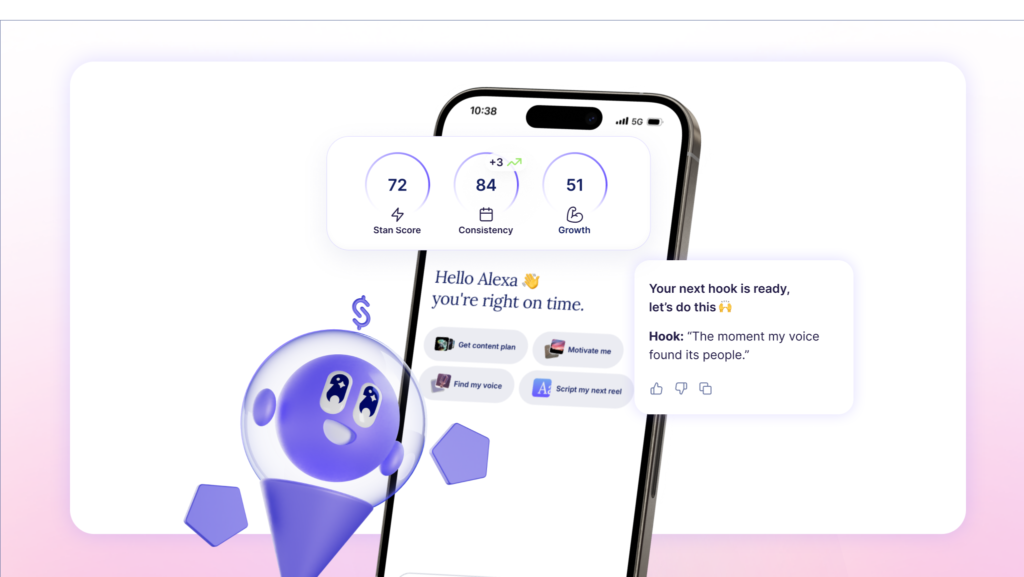
Trial Reels give you room to test and learn. Stanley helps you do it faster—without losing your voice. Here’s how the two work together:
- Ideate: You can ask Stanley to help you come up with or refine Trial Reel ideas tailored to your brand, so you’re never stuck ideating solo.
- Test hooks: Stanley can generate multiple hook variations for the same concept, so you can test them as Trial Reels and see what sticks.
- Write scripts: You can create even faster by having Stanley draft a full Reel script in your voice that aligns with your goals, leads with a compelling hook, and fits the structure you’re going for.
- Discover trends: The days of manually scrolling your feed for inspiration are over. Stanley can pull top-performing content in your niche within seconds, then help you make them yours. You’ll be able to experiment with trends even faster and replicate the success of similar accounts.
- Understand what works: Stanley is here to walk you through what’s performing and why. While it can’t automatically see your Trial Reel data itself, it can help you make sense of the numbers and cross-analyze them with your past Instagram performance so you can act on your Trial Reel insights.
How to Make Trial Reels Part of Your Workflow
The Creators who get the most out of Trial Reels aren’t treating them like a one-off—they’re building experimentation into their workflow and using it to inform their next move.
Here’s how to make them part of your routine and how Stanley can help every step of the way.
Step 1: Identify 1-2 Experiments Each Week
Before you start using Trial Reels, you’ll want to think about what you’re trying to achieve and how these experiments will help.
Start with your goals and work backward. Maybe you want to validate a new idea. Reach fresh audiences. Or try out a trend. Then, use your goal to ideate on Trial Reel content with Stanley.
Try asking questions like:
- What’s a format I haven’t tried that’s working for Creators in my niche?
- Give me 3 content ideas that are outside my usual pillars but still relevant to my audience.
- Show me today’s top performers in my niche and how I can adapt them.
Stanley already knows your voice, your patterns, and what’s been working for you, so the ideas it generates won’t feel random. It’ll give you strategic starting points for your experiments.
Step 2: Generate Hook Variations and Scripts
Once you’ve got an idea, you can work with Stanley to bring it to life. Instead of guessing at the best hook, have Stanley generate 2-3 variations you can test as separate Trial Reels. Then, work with Stanley to script the Reel using those hooks.
Try this Stanley prompt: Script a 30-second Reel using this hook: [hook]. Keep it in my voice and end with a CTA to [your goal].
Step 3: Post Your Trial Reels
After you’ve created your Reel, open Instagram, upload it, toggle on the “Trial” option, and hit publish.
If you’re A/B testing Reels, make sure you:
- Post each variation at the same time of day
- Don’t change more than one variable per test (like your hook, audio, or caption)
- Let the trial run for at least 24-48 hours before checking results

When your experiments are controlled, you walk away with clearer insights on what to do next.
Step 4: Analyze What Worked
After 24 hours, you’ll be able to see your Trial Reels’ performance data within the Instagram app. You’ll want to pay close attention to:
- Views: Which Reels got the most eyeballs?
- Completion rate: Which Reels did people watch all the way through?
- Engagement: What got the most saves, shares, and comments?
But raw numbers only tell part of the story.
Stanley can help you make sense of what your data actually means—drawing on not just the Trial Reel’s analytics itself, but your past account performance and patterns. It’ll help you connect the dots, so you’re not just looking at numbers, you’re building a clearer picture of what your audience will respond to.
Try this Stanley prompt: My Trial Reel with [hook] got [X views, Y likes, Z shares, etc.]. Compared to my usual performance, what does this tell me about what’s resonating and what’s not?
Step 5: Publish What Performs Best
Once you’ve determined that a Trial Reel performed well, share it with your audience.
You can do this manually by going to the Trial Reel and tapping “Share to Everyone.” Or, if you toggled on auto-share when you posted, Instagram will push it out automatically if it performs well within 72 hours.
Step 6: Iterate on What Didn’t Work
Not every Trial Reel will perform, and they’re not supposed to. They’re designed to help you explore ideas and get data-driven insights.
When something underperforms, don’t just move on—figure out why.
Was it the hook? The pacing? The topic itself?
Then, iterate on the video or use that information for your next content idea. Stanley can help you come up with new angles to test. And because it knows your past performance, it can spot patterns you might be missing.
Test and Learn With Stanley Instagram
Experimentation is how you grow faster—but you don’t want to tank your engagement or lose followers doing it.
That’s why you should be using Trial Reels. They’re a low-risk way to test your ideas and learn from real data without impacting your audience. And when you pair Trial Reels with Stanley, you can test more, learn faster, and grow without burning out.
Stanley helps you ideate, create content in your voice, and make sense of what the data is telling you. It’s the #1 tool for Instagram Creators who are serious about growth and don’t want to lose their authenticity to get there.
Ready to see what Stanley can do for your Instagram? Start your free trial today.
FAQ: Instagram Trial Reels
You need a professional account (Creator or Business) to access Trial Reels. Instagram has been expanding access, and most Creators with at least 1,000 followers now have the feature available.
Not in their main feed, on your profile, or in the Reels tab. However, Trial Reels can be shared via DMs or Stories, so there’s a small chance followers might see them that way.
Instagram provides metrics about 24 hours after you post a Trial Reel. You’ll see metrics like views, likes, comments, and shares.
Yes. When posting, you can toggle on an option to automatically share the trial Reel to your full audience if it performs well within the first 72 hours.
Instagram has started implementing daily limits—typically around 5 per day, though this can vary by account.
When you post a regular Reel, it goes to your followers first. Their engagement (or lack of it) affects how the algorithm pushes it to new people. Trial Reels bypass your followers entirely, so you get cleaner data from a fresh audience.
When you post a regular Reel, it goes to your followers first. Their engagement (or lack of it) affects how the algorithm pushes it to new people. Trial Reels bypass your followers entirely, so you get cleaner data from a fresh audience.
Absolutely. Stanley can generate hook variations for A/B testing, surface top-performing trends in your niche for you to try, write scripts in your voice, and much more.