Reading Tracker Template + Resell + Canva Course
$14.99$39.99
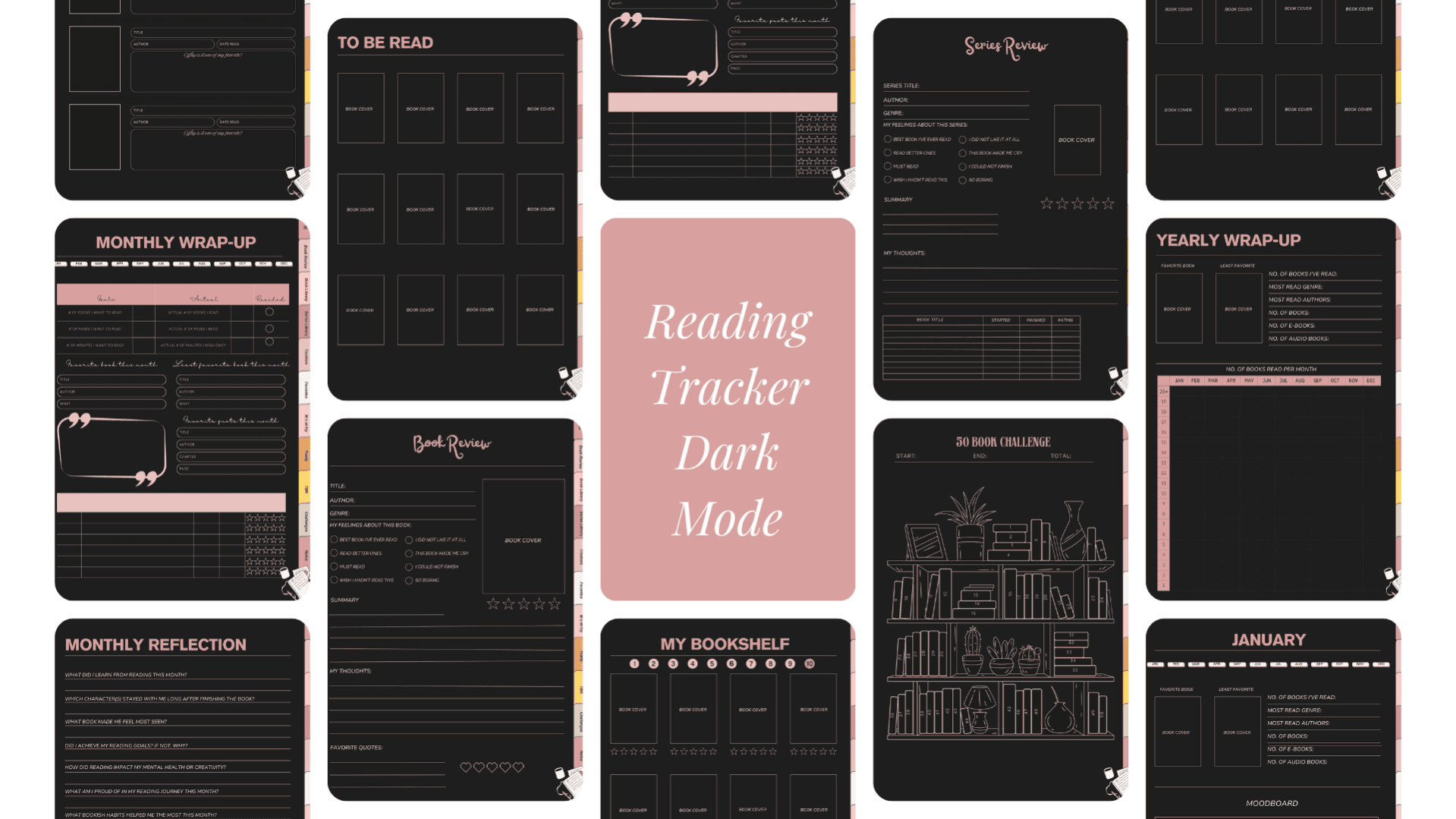
📚 Digital Reading Tracker and Journal - Dark + Light Mode
Editable in Canva with resell rights
This digital reading tracker and journal was created for readers who love keeping track of their books in a calm, organized, and creative way ✨ Whether you read occasionally or every single day, this journal helps you document your reading journey while leaving space for reflection and personal notes.
It can be used on an iPad with GoodNotes and comes with full Canva access so you can customize it to fit your own style or brand 🎨
📖 What’s included
Inside this reading journal you’ll find a complete system to track both your reading habits and your favorite stories.
You’ll get a My Bookshelf section to visually log your books, along with pages for favorite books and favorite series. There are dedicated pages for book reviews and series reviews so you can capture your thoughts as you read ✍️
For monthly tracking, the journal includes a reading tracker, a monthly wrap up, and a reflection page for each month 🌙 You’ll also find a yearly reading tracker and a yearly reflection page to look back on your progress and growth.
To make things even more fun, the journal includes book trackers and reading challenges 🏆
🎨 Editable in Canva
You’ll receive access to the Canva template, which means you can easily edit colors, fonts, layouts, and pages. You can add new sections, remove pages you don’t need, or fully rebrand the journal to match your own aesthetic.
If you’re new to Canva, you will get a BONUS Canva crash course.
💼 Commercial use and resell rights
This product includes commercial rights. You are allowed to modify the journal and resell your edited version as your own product.
Please note that the journal may not be resold as is. Changes must be made before reselling, out of respect for the time and effort that went into creating the original design 🤍
📘 Bonus guide included
Along with the journal, you’ll receive a short guide that explains how this tracker was made, how to customize it, and how to properly prepare it for resale. This is perfect if you want to learn the process while creating something of your own ✨
📲 How it works
After purchase, you’ll receive the files and the Canva access link. You can customize the journal if you’d like, then import it into Good Notes on your iPad and start using it right away 📱
⚠️ Please note
This is a digital product and no physical item will be shipped. Due to the nature of digital files, refunds are not available.
🎓 BONUS CANVA CRASH COURSE CURRICULUM
Chapter 1: Getting Started with Canva
Navigate Canva's interface with confidence and understand the basics that most tutorials skip over.
Chapter 2: Your Workspace
Set up your workspace efficiently so you can create content faster and stay organized.
Chapter 3: Your Toolset
Master the essential tools you'll use in every single design. No fluff, just what actually matters.
Chapter 4: Font Pairing, Hyperlinks & Brand Kit
Learn which fonts work together, how to add clickable links, and create a brand kit that keeps your content cohesive.
Chapter 5: Canva Magic Studio
Unlock Canva's powerful features including background remover, magic resize, and more.
Chapter 6: My Favorite Canva Elements for Posts
Discover the exact elements I use to create scroll-stopping bookstagram content (all free or Pro elements clearly labeled).
Chapter 7: Saving and Sharing Your Projects
Never lose your work again. Learn the right way to save, organize, and share your designs.
Chapter 8: Apps & Other Canva Features
Explore hidden features that take your designs from good to professional.
Chapter 9: How to Create Digital Products
Guide to creating templates, presets guides, and other digital products you can sell.
Chapter 10: How to Edit This Guide to Resell
Bonus content showing you how to customize this course and sell it under your own brand.
Chapter 11: Private Label Rights Licence
Understand your rights to modify, rebrand, and resell this course as your own product.
✨ WHO THIS IS FOR
✓ Bookstagrammers tired of their content looking "off" ✓ Creators who want to design quickly without sacrificing quality ✓ Anyone wanting to create digital products to sell ✓ People who learn better with video tutorials than written guides
No prior Canva experience required