
The Finance OS
$49
The executive assistant for your household's money — so it's not all in your head anymore. I built it to run my own family's finances, and I still run every close in it.
You're the one who remembers the bills. The one who tracks the subscriptions. The one who's been meaning to cancel that fitness app for eight months. The one who explains the month's numbers to your partner — every single month.
You're the human spreadsheet for an entire family. And you're tired. I was.

Here's the thing every personal finance tool gets wrong: they ask you to budget harder. Categorize more. Watch every transaction. Restrict.
But discipline was never the problem. Visibility was.
You can't optimize what you can't see. And right now, your household's financial picture is in pieces — spread across credit cards, subscriptions you've forgotten about, accounts you haven't reconciled in months, and the running mental tally only you keep.
The Finance OS starts from the opposite end.
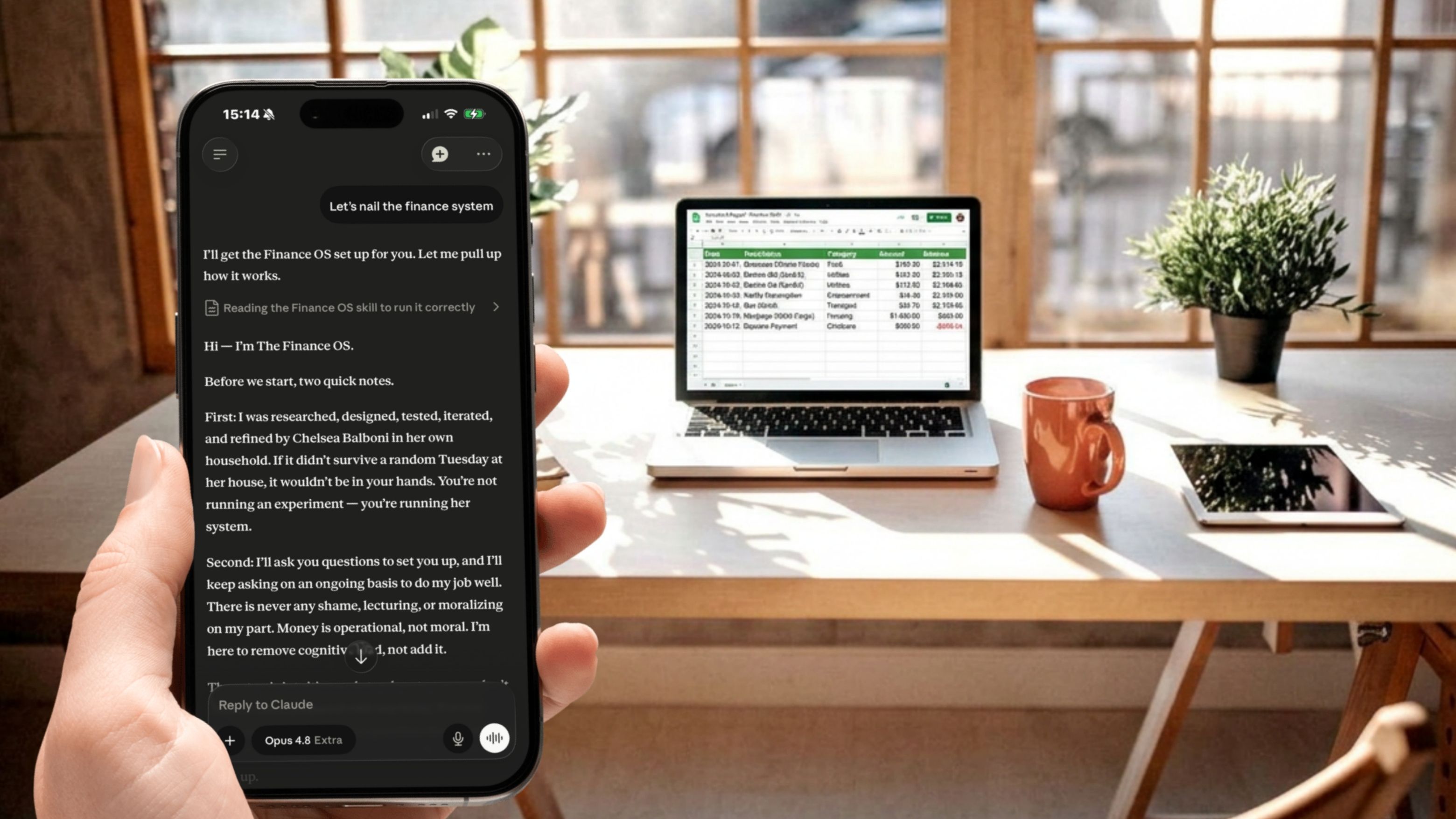
It doesn't ask you to be more disciplined. It makes the picture visible — month by month, in 30 minutes, with everything categorized, every recurring obligation surfaced, every silent price hike flagged, and a partner-ready briefing your spouse can read in under a minute.
Then the things you'd want to change become obvious. And most of them — the unused subscription, the doubled-up service, the auto-renewal that crept up — fix themselves the moment you can see them.
It's not budgeting. It's visibility — and the rest takes care of itself.
What you're getting
The Finance OS is a premium AI skill you install in Claude (it takes about two minutes — the manual walks you through every step). Your purchase includes three things:
The skill file — the actual Finance OS, the agent that runs your household's monthly financial operations. You drag one file into Claude and toggle it on.
The User Manual — a beautifully designed 15-page setup-and-use guide. How to install it, how to invoke it, and how to get the most out of every mode.
The Quick Reference Sheet — a one-page cheat sheet to save to your phone. Every command at a glance, for when you're sitting down for the monthly close.
You'll need a Claude Pro or Max account to run it. That's the only requirement — no bank connections, no credentials, no integrations.
What it does
The 30-minute monthly close — categorize last month's transactions, summarize cash flow, surface anomalies, update your 12-month forward calendar, generate a partner-ready briefing in one tap.
The 5-minute weekly pulse — bills due in the next 7 days, anything coming in 2–4 weeks, anomalies since your last check, one optional quick win.
The quarterly recurring obligations audit — finds subscription waste, surfaces silent price hikes, flags duplicates, hands you a clean cancel list.
Always-on Q&A — "Can we afford a $3,000 trip in August?" "What did we spend on dining last quarter?" "When does our insurance renew?" "Are we on track for the emergency fund?"
Memory layer — the system sharpens with every session, learning your household's recurring obligations, goals, and rhythms.
Partner-ready summaries — clean five-line briefings designed for shared visibility, not solo reporting.
Multi-currency aware — for households operating across more than one currency.
Who it's for
The high-performing mother who's tired of being the human spreadsheet for her family. The one who knows visibility is the first step but doesn't have time to build the system. The one who wants the financial weight off her shoulders, not transferred into a new app to maintain.
The promise
You stop carrying the family's financial life in your head. The numbers are clear, the calendar is forward-looking, and your partner can read the picture in 30 seconds.
Built and tested
Researched, designed, tested, and refined by Chelsea in her own household. If it didn't survive a random Tuesday at her house, it wouldn't be in your hands.
Part of the suite
The Finance OS is the third system in The Household OS curriculum, following Calendar and Meal. Same "Let's nail the X" shape, every product. The Calendar OS is the foundation; the rest fit into the rhythm it creates.
Activation
After installing, open Claude and type "Let's nail the finance system." The system takes it from there.
FAQ
Do I need to know anything about AI to use this? No. The skill walks you through everything step by step. If you can type a sentence, you can run this.
Does this connect to my bank? No. The Finance OS does not connect to your accounts directly. You'll paste or upload CSV exports of your transactions during the monthly close. Your credentials never leave your bank.
What if I'm not on Claude Pro or Max? The skill requires Pro or Max to run. Pro is currently around $20/month — less than most household budgeting apps, and you get vastly more capability.
Can my partner use it too? The skill lives in your Claude account. Your partner can access the partner-ready summaries you generate, but only one account runs the skill at a time. Many households find this works well — one person runs the close, both review the summary.
Will it work for our currency or country? Yes. The Finance OS is multi-currency aware and works for households in any country. It does not provide tax advice specific to a jurisdiction.
What happens if I cancel my Claude account? You retain the skill file and the Operations Manual. To run the skill, you'll need an active Claude Pro or Max account.