
TL;DR: After rigorously analyzing what has worked on LinkedIn in the last 6 months, the biggest predictors of posts that spark conversations are longer post length (1,000–1,800 characters) plus heavy formatting (line breaks), a short first line hook (<60 characters), ending with a question, and keeping links out of the post body (put them in the comments).
Forget generic advice. We looked at six months of real data to find out what separates posts that spark conversations from those that disappear into the feed.
Everyone has an opinion about what works on LinkedIn. Post in the morning. Keep it short. Use emojis. Add a selfie.
The problem? Most of that advice is based on vibes, not data.
So we decided to do something about it.
Our data team conducted a rigorous analysis of what has worked on LinkedIn in the past six months, comparing Creators of every size on equal footing. This is the kind of analysis that powers the weekly insights we send to Stanley LinkedIn users—and today we’re sharing the highlights with everyone.
What we found challenges a lot of the conventional wisdom and gives you a clear, data-backed playbook for writing posts that actually get seen, shared, and discussed.
Let’s dig in.
1. Longer Posts Win—But Only If You Format Them Right
Here’s the first surprise: short posts don’t actually perform better. In fact, they perform significantly worse.
Posts with 1,200+ characters consistently get 3x the engagement of short ones under 200 characters. The sweet spot sits right around 1,200–1,800 characters, where median engagement peaks at 0.464%.
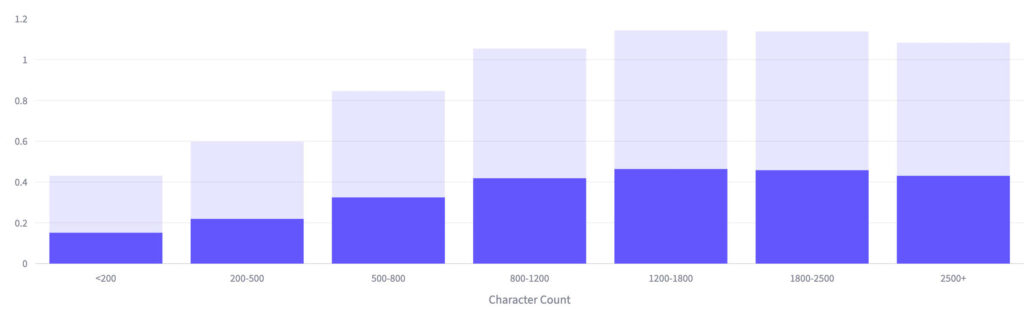
But here’s the catch—and it’s a big one. Length alone isn’t enough. A 1,000-character wall of text actually performs worse than a shorter, well-formatted post.
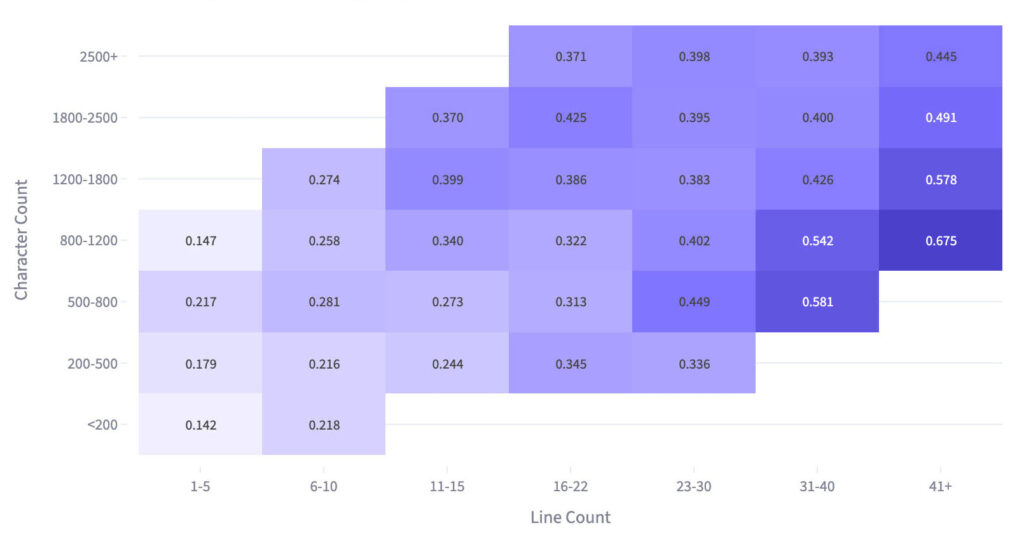
The real magic happens when you combine length with scannability. When we crossed post length against line breaks, the data told a dramatic story.
For example, take two posts in the 800–1,200 character range. The one with 41+ line breaks gets a 0.675% engagement rate. The one with just 1–5 line breaks? A measly 0.147%.
Same length. Same topic potential. A 4.6x difference from formatting alone.
2. Your First Line Is Everything (Keep It Under 60 Characters)
LinkedIn truncates your post after the first line or two, hiding the rest behind a “see more” link. That means your hook has one job: stop the scroll and earn the click.
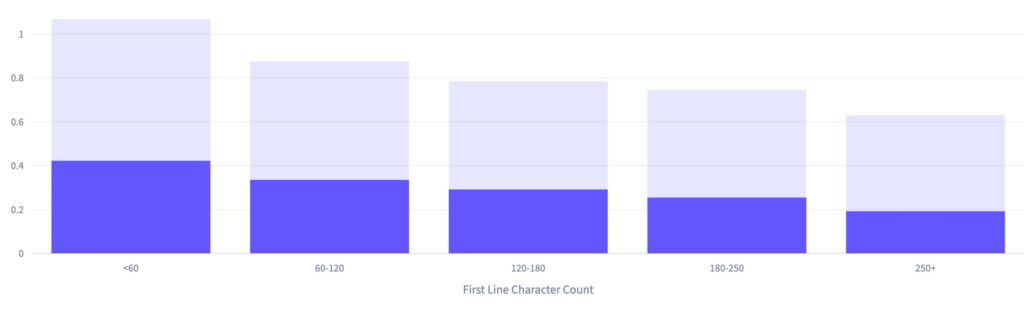
The data here is strikingly linear (and unforgiving). Hooks under 60 characters achieve a 0.422% engagement rate, while hooks over 250 characters manage just 0.191%. That’s a 2.2x difference, and there’s no recovery point anywhere in between.
At 60–120 characters, you’re already down to 0.335%. By 120–180, it’s 0.291%. The decline is perfectly steady—every additional character in your opening line is literally costing you engagement.
What’s interesting is that short hooks are already the most common approach in our dataset—nearly half of all posts use them. The fact that they still outperform despite being the default tells you this isn’t just a novelty effect.
Short, punchy openers are genuinely more effective at earning attention. The algorithm rewards them, and so do human thumbs.
3. Questions Are Your Secret Weapon for Comments
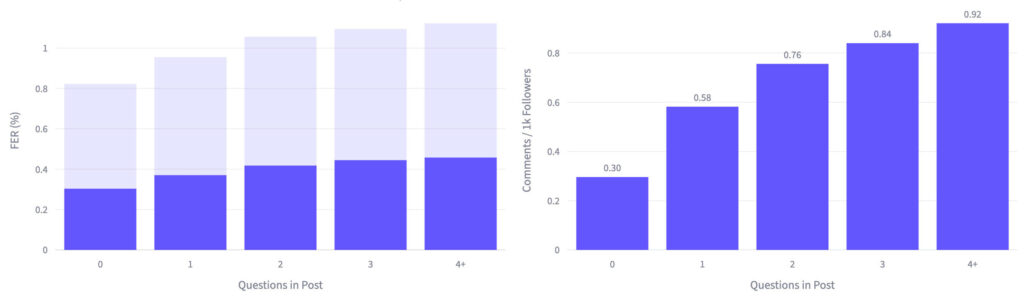
If engagement is the goal, questions are probably the single most underused tool in most Creators’ arsenals. The relationship between question count and engagement is one of the clearest signals in the entire dataset.
Posts with zero questions get 0.30 comments per 1,000 followers.
Posts with four or more questions? 0.92.
That’s a near-tripling of discussion from simply asking your audience to think and respond.
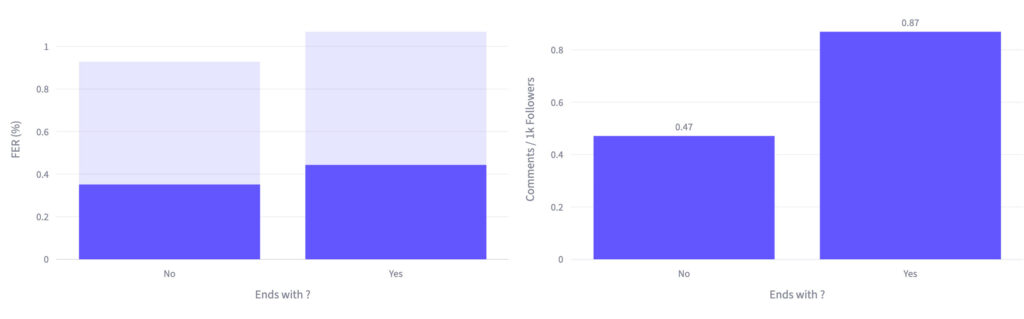
You don’t need to overhaul your entire post. Just ending with a question adds 26% to overall engagement and a massive 85% to comment density.
And adding a question mark at the end nearly doubles the discussion your post generates.
4. Links Kill Your Reach (Put Them in Comments)
This one won’t surprise experienced LinkedIn Creators, but the magnitude of the penalty might. A single link in your post drops engagement by 38% and cuts comment density by 59%.
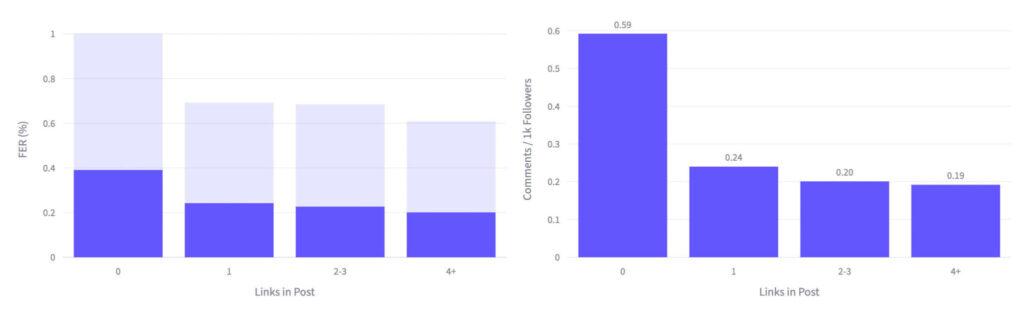
Look at the comment density chart on the right. It’s a cliff: 0.59 comments per 1K followers with no links, then it plummets to 0.24 with just one.
LinkedIn deprioritizes posts that send users off-platform. And the penalty hits top performers just as hard—the 75th percentile drops from ~0.98% to ~0.70% with a single link.
5. When You Post Matters (But Less Than You’d Think)
Timing is the least dramatic variable in this study, but it’s still worth optimizing once you’ve nailed the content fundamentals.
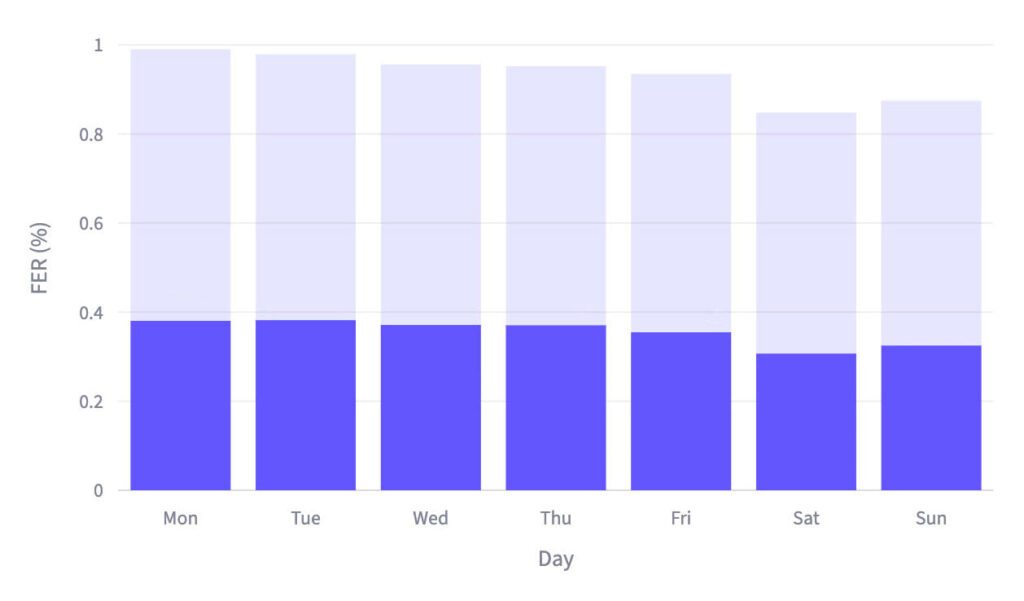
Monday through Thursday are your strongest days, with engagement rates clustering between 0.355%–0.382%. Friday already starts to slip, and weekends drop ~15–20% overall. Interestingly, Sunday slightly outperforms Saturday, making it the better option if you need to post on a weekend.
For time of day, early morning (5–8 AM ET) consistently produces the best results. There’s also a secondary evening window around 8–11 PM ET that performs pretty well—likely catching a second wave of scrollers winding down for the night.
The Playbook: Putting It All Together
If you only remember five things from this study, make it these:
- Write 1,000–1,800 characters—long enough to deliver real value, short enough not to lose people. This range consistently outperforms both shorter and longer posts.
- Format aggressively—use short paragraphs, single-sentence lines, and plenty of white space. The same content formatted for scannability gets 4.6x more engagement than a wall of text.
- Hook them in under 60 characters—your first line is an audition. Make it punchy, specific, and curiosity-driven. Every extra character costs you.
- End with a question—this single change adds 26% to engagement and nearly doubles comments. It’s the highest-ROI edit you can make.
- Keep links out of the post body—even one link drops your engagement by 38%. Share them in the first comment instead.
None of these findings require more talent, a bigger audience, or better ideas. They’re structural choices—formatting, length, placement—that you can apply to your very next post.
The data says they work. The rest is up to you.
Want These Insights Working for You Every Week?
This study is a snapshot of what we’re building into Stanley LinkedIn—an AI content coach that analyzes your LinkedIn performance, learns your voice, and helps you write posts that land. Weekly analytics, personalized post ideas, and a creative teammate that gets better the more you use it. Try Stanley LinkedIn Free