
TL;DR
Instagram growth becomes easier when content ideas come from systems rather than random inspiration. Creators who organize their ideas into repeatable categories, expand a concept into multiple posts, and mix formats such as Reels, carousels, and Stories tend to publish more consistently and reach wider audiences. Educational posts build authority, interactive content strengthens community, and structured idea banks keep content flowing.
Running out of Instagram content ideas is one of the most common challenges Creators face.
You sit down to post. You open Instagram. And the same question appears again.
What should I post today?
Most Creators have plenty they could share. Insights from their work. Lessons from experience. Stories from their journey.
The real challenge is turning those thoughts into clear, repeatable content ideas when it’s time to publish.
Without a simple structure for generating ideas, consistent posting becomes harder than it needs to be. And consistency is one of the strongest signals the Instagram algorithm responds to.
Creators who grow steadily usually rely on content frameworks that make publishing easier week after week. Instead of depending on random inspiration, they work from pools of ideas that can be adapted across different formats.
A single concept can become a Reel, a carousel, or even a Story conversation with your audience. Once you start approaching content this way, the pressure of starting from scratch every time begins to disappear.
In this guide, you’ll find 66 Instagram content ideas you can start using immediately. We’ll also explore how Creators generate creative ideas consistently so they always have something meaningful to share.
Let’s get started.
Educational Instagram Content Ideas
Educational content is one of the most effective strategies in social media marketing, especially for growing an Instagram account.
When people learn something useful from your content, they are more likely to save the post, share it with friends, and follow your account for future insights.
This is why many fast-growing Creators make educational content a core part of their strategy.
The good news is that you don’t need to be a professor to create educational posts. Most of the time, valuable content simply comes from sharing what you already know in a clear and structured way.
Below are educational Instagram content ideas you can adapt to your niche:
1. Share a Quick Tutorial
Short tutorials are one of the easiest ways to create educational content.
People love learning something practical they can apply immediately.
Instead of trying to teach everything at once, focus on solving one small problem.
For example:
- “How to write a hook that stops the scroll”
- “How to edit Instagram Reels faster”
- “How to find trending sounds in under 2 minutes”
These work especially well as Reels because viewers can quickly follow the steps.
A simple structure you can follow is:
- Step 1: Hook the viewer with the result
- Step 2: Show the steps quickly
- Step 3: Recap the takeaway
Example hook:
“Most Creators struggle with this part of Instagram Reels. Here’s the shortcut.”
Short tutorials tend to generate saves, which helps posts perform better in the algorithm.
2. Explain a Common Beginner Mistake
Every niche has mistakes that beginners repeat again and again.
Calling attention to these mistakes creates content that feels helpful and relatable.
You could create posts like:
- “3 mistakes beginner Creators make on Instagram”
- “Why most people fail at building an audience”
- “The biggest mistake I made when starting out”
This type of content works well because it combines education with storytelling.
A simple format could be:
- Slide 1: The mistake
- Slide 2: Why it happens
- Slide 3: What to do instead
Carousel posts are especially effective here because they allow you to break down the idea step by step.
3. Break Down a Complex Concept
Many topics in business, marketing, and creative work feel complicated at first.
Creators who can simplify complex ideas quickly become valuable sources of information.
For example, if your niche is content creation, you might explain:
- how the Instagram algorithm distributes content
- how audience retention affects Reel reach
- how Creators turn followers into customers
The goal is to make something complex easy to understand within 30–60 seconds.
A good technique is using visual explanations in carousels.
Here’s an example structure:
- Slide 1: The concept
- Slide 2: What it means
- Slide 3: How it works
- Slide 4: Why it matters
Posts like this often receive high saves because followers want to reference them later.
4. Share a Step-by-Step Guide
Step-by-step guides work well because they provide clear direction.
Instead of giving general advice, you walk the audience through a specific process.
For example:
- “How to plan a week of Instagram content in 30 minutes”
- “How to script a viral Reel”
- “How to turn one idea into five posts”
Carousel posts are ideal for this format because each slide can represent a step.
This structure works well:
- Slide 1: The result
- Slide 2–6: Each step explained
- Final slide: Summary or key takeaway
Guides like this often become highly shareable resources within your niche.
5. Debunk a Common Myth
Every industry has advice that spreads widely but isn’t always accurate.
Debunking these myths can spark strong engagement because people enjoy seeing misconceptions clarified.
Examples could include:
- “You don’t need to post every day to grow on Instagram”
- “Viral posts don’t guarantee follower growth”
- “More hashtags doesn’t always mean more reach”
This format works well as either a Reel or a carousel.
A simple structure might look like:
- Hook: “Most Creators believe this about Instagram growth.”
- Explanation: Why the idea is misleading.
- Better perspective: What actually matters.
Posts like this often encourage comments because people want to share their opinions.
6. Answer a Frequently Asked Question
If people regularly ask you the same question, that question is already a content idea.
Audience questions are powerful because they reflect real curiosity from your followers.
For example:
- “How often should you post on Instagram?”
- “How long should an Instagram Reel be?”
- “What makes a post go viral?”
These questions can easily become quick Reels or carousel explanations.
You could even turn this into a recurring series such as:
“Creator Question of the Week.”
Over time, this builds a library of helpful answers your target audience can reference.
7. Share Industry Insights
Insight posts help position you as someone who understands where your niche is heading.
Instead of just sharing tips, you discuss trends and observations.
For example:
- new Instagram features
- changes in the algorithm
- emerging Creator strategies
- shifts in audience behavior
Content like this often attracts Creators who want to stay informed about the platform.
Example angle:
“Why shorter Reels are outperforming longer videos right now.”
This type of post can spark thoughtful discussion in the comments.
8. Teach a Shortcut or Productivity Tip
Small improvements that save time are extremely valuable for Creators.
Shortcuts, hacks, and efficiency tips are especially popular because they provide immediate benefits.
Examples:
- “A faster way to plan Instagram captions”
- “How to batch record five Reels in one hour”
- “The easiest way to organize your content ideas”
These posts work well in fast-paced Reels where you demonstrate the shortcut quickly.
Creators often save this type of content to try the method later.
9. Recommend a Tool or Resource
Creators are always searching for tools that make their workflow easier.
Sharing tools you genuinely use can become a valuable type of educational content.
For example:
- content planning tools
- editing apps
- analytics platforms
- idea generation tools
You could create posts like:
“3 tools that make creating Instagram content easier.”
Showing how a tool fits into your workflow makes the recommendation feel practical rather than promotional.
10. Share a Lesson From Your Experience
Some of the most engaging educational content comes from personal experience.
Instead of teaching abstract concepts, you share lessons learned along the way.
For example:
- “What I learned after posting 100 Instagram Reels”
- “3 lessons from growing my first 10,000 followers”
- “What I would do differently if I started again”
Posts like this combine education and storytelling, which makes them highly engaging. They also help followers feel more connected to your journey.
Instagram Reel Content Ideas
If your goal is to reach new audiences on Instagram, Reels should be part of your strategy.
Unlike regular feed posts, Reels are designed for discovery. Instagram actively distributes them beyond your existing followers, which means a single well-performing Reel can introduce your content to thousands of new people.
That reach is why many Creators prioritize Reels when they want to grow faster.
Below are Reel content ideas that consistently perform well across different niches:
11. Before-and-After Transformations
Transformation content naturally captures attention because people enjoy seeing progress. This format works well in many niches.
Examples include:
- fitness transformations
- workspace upgrades
- editing before and after
- design improvements
- marketing campaign results
A simple structure could be:
- Opening clip: Show the “before” situation.
- Middle section: Briefly explain what changed.
- Final clip: Reveal the improved result.
Adding a quick explanation of how the transformation happened makes the content more educational and shareable.
12. Day-in-the-Life Videos
“Day in the life” Reels allow followers to see how you work, create, or manage your business.
These videos feel authentic and give audiences a closer look at your routine.
Examples might include:
- a Creator planning their weekly content
- a designer working through a project
- a coach preparing for a client session
You don’t need elaborate production. Short clips from different parts of your day can be combined into a quick sequence.
Many Creators pair these clips with text overlays explaining what’s happening at each step.
13. Quick Tip Reels
Quick tips are one of the simplest types of Reels to produce.
They work well because they deliver immediate value in a short amount of time.
For example:
- “One trick to improve your Instagram hooks”
- “A faster way to edit Reels”
- “One caption idea that increases comments”
A useful format is:
- Hook: Introduce the problem.
- Tip: Explain the solution quickly.
- Call to action: Encourage viewers to save the video for later.
These types of Reels often generate strong save rates, which helps them perform well.
14. Behind-the-Scenes Content
Audiences enjoy seeing the process behind finished work.
Behind-the-scenes posts, including Reels, help followers understand how something is created.
Examples include:
- recording a video setup
- editing a piece of content
- designing a product
- preparing for an event
Showing your process can make your work feel more accessible and relatable. It also reinforces your expertise in your field.
15. “3 Things I Wish I Knew Earlier”
Reflection-based content resonates strongly because it combines experience with advice.
Creators often use this format to share lessons from their journey.

For example:
- “3 things I wish I knew before starting on Instagram”
- “3 lessons from building my first online business”
- “3 mistakes I made when creating content”
This format works well because it’s structured, concise, and easy to follow. Each lesson can appear as a short segment within the video.
16. Trend Adaptation Within Your Niche
Instagram trends often spread quickly, especially through trending audio.
Creators who adapt these trends to their niche can reach wider audiences while still providing relevant content. The key is to give the trend your own angle.
For example, a popular audio trend could become:
- a marketing insight
- a Creator lesson
- a productivity tip
This keeps the content aligned with your brand while still benefiting from the visibility of the trend.
17. Fast-Paced Tutorials
Fast-paced tutorials work particularly well on Reels because they match the short-form format.
Instead of a long explanation, you show a process quickly.
Examples include:
- editing techniques
- content planning workflows
- quick productivity hacks
Many Creators combine screen recordings, text overlays, and voiceovers to explain the steps clearly.
These Reels often receive strong engagement because viewers replay them to follow the instructions.
18. Storytime Content
Storytelling is one of the most powerful ways to keep viewers watching.
A short story about something that happened in your journey can turn into compelling content.
Examples might include:
- a mistake that taught you an important lesson
- a surprising result from a project
- a challenge you faced while building your audience
A good storytime Reel usually begins with a strong hook such as:
“Last year I almost quit creating content because of this mistake.”
That opening line creates curiosity and encourages viewers to keep watching.
19. Highlighting Common Mistakes
Mistake-based content performs well because people want to avoid common pitfalls.
A Reel could highlight mistakes such as:
- poor hook writing
- unclear captions
- weak calls to action
The structure is simple:
State the mistake. Explain why it happens. Offer a better approach.
These posts tend to generate strong engagement because viewers recognize the mistakes in their own work.
20. Demonstrating Your Process
Showing how you do something from start to finish can be extremely valuable for your target audience.
Process videos often attract viewers who want to learn the methods behind successful work.
Examples might include:
- writing a caption
- designing a graphic
- planning a week of content
These Reels help position you as someone who understands the craft behind your niche.
21. Mini Case Studies
Case studies show how a strategy or idea worked in practice.
Instead of explaining a concept abstractly, you demonstrate it through a real example.
For instance:
- analyzing why a post went viral
- explaining how a campaign achieved results
- breaking down audience growth over time
Mini case studies provide both education and credibility.
22. Reaction Videos
Reaction videos allow you to comment on content, trends, or opinions within your niche.
For example:
- reacting to new Instagram features
- reviewing a marketing strategy
- commenting on industry news
These videos work well because they combine information with personality.
Your perspective becomes the central part of the content.
Instagram Carousel Content Ideas
While Reels are powerful for discovery, carousel posts are one of the best formats for depth.
Carousels allow you to walk someone through an idea step by step. Instead of trying to explain everything in a few seconds, you can expand the concept across multiple slides.
This format naturally encourages two important engagement signals:
- saves, because people want to revisit the information
- swipes, which increase the time someone spends interacting with your post
Both signals help Instagram understand that the content is valuable.
Carousels also work particularly well for educational and strategic content, which makes them popular among Creators, coaches, and online educators.
Below are carousel content ideas you can adapt to your niche:
23. Step-by-Step Frameworks
Framework posts break down a process into clear stages.
Instead of presenting an idea in a single paragraph, each slide focuses on one step. This makes the content easier to digest and follow.
For example:
- Slide 1: “5 Steps to Planning a Week of Instagram Content”
- Slide 2: Choose your content themes
- Slide 3: Outline the key ideas
- Slide 4: Decide the format (Reel, carousel, Story)
- Slide 5: Write the hooks and captions
- Slide 6: Schedule or batch create
Framework-style posts are highly saveable because they provide a repeatable system readers can use later.
24. “Mistakes to Avoid” Lists
Mistake-based carousels are effective because they address problems many people already experience.
These posts usually follow a clear pattern:
- Slide 1: “5 Instagram mistakes that slow down your growth”
- Slides: 2–6 Each mistake explained briefly
- Final slide: A summary or takeaway
Examples could include:
- mistakes Creators make with Reels
- mistakes beginners make when building an audience
- mistakes people make when selling digital products
Posts like these often spark conversation because followers recognize the mistakes in their own work.
25. Resource Roundups
Resource posts help your audience discover tools, books, or learning materials that can improve their workflow.
For example:
- “5 tools that make creating Instagram content easier”
- “7 websites every content Creator should know”
- “5 apps that simplify video editing”
Each slide can introduce one resource with a short explanation of how it helps. These types of posts are frequently saved because they become reference lists.
26. Mini Tutorials
Some topics require more explanation than a Reel allows.
Carousel tutorials provide space to teach something clearly without rushing the explanation.
Example topics might include:
- writing captions that encourage comments
- structuring a high-performing Reel
- building a simple Instagram content calendar
Each slide introduces one step in the process, making the learning experience more structured.
This format works particularly well for educational content Creators.
27. Checklists
Checklist-style posts are simple but extremely effective.
They help readers quickly evaluate whether they’ve completed key steps in a process.
Examples include:
- “Checklist before posting your Instagram Reel”
- “Things every Creator should do before launching a product”
- “Checklist for writing better captions”
A typical structure might be:
- Slide 1: The checklist title
- Slides 2–7: Individual checklist items
- Final slide: Encourage readers to save the post for later reference.
Checklists are often saved because they function like quick reminders.
28. Strategy Breakdowns
Strategy carousels explain how something works behind the scenes.
Instead of giving quick tips, these posts walk through the logic behind a successful approach.
For example:
- how Creators grow on Instagram using Reels
- how to structure a content series
- how engagement signals influence reach
These posts position you as someone who understands the strategy behind the platform, which helps build authority.
29. Case Study Analysis
Case studies are powerful because they show ideas in action.
Instead of explaining a concept abstractly, you analyze a real example.
For instance, you might break down:
- why a particular Reel gained traction
- how a Creator structured a viral post
- how a brand used storytelling effectively
Slides could follow this structure:
- Slide 1: The example
- Slide 2: What the Creator did
- Slide 3: Why it worked
- Slide 4: What others can learn from it
This type of content often attracts Creators who want to understand what actually drives results.
30. Data and Insights Posts
Data-backed content builds credibility.
Sharing insights from research, analytics, or industry observations can position your account as a reliable source of information.
Examples might include:
- Instagram engagement trends
- content formats performing well this year
- how audience behavior is evolving
Each slide can highlight one insight along with a short explanation.
Posts like these are frequently shared because they help others stay informed about the platform.
31. “Do This Instead” Comparisons
Comparison posts clarify better approaches by showing two alternatives side by side.
For example:
- Slide 1: “Instead of doing this on Instagram, try this.”
- Slides 2–5: Each slide compares a weaker approach with a stronger one.
Examples might include:
- weak hooks vs stronger hooks
- generic captions vs engaging captions
- random posting vs structured content planning
These posts work well because they show clear improvements rather than abstract advice.
32. Content Idea Banks
You can also create carousel posts that simply share lists of content ideas.
This type of content is especially useful for Creators who want inspiration quickly.
Examples include:
- “10 Reel ideas for Creators”
- “8 Instagram Story prompts to boost engagement”
- “Content ideas for faceless Creator accounts”
Ironically, these posts often perform very well because many people are searching for inspiration. They also position you as someone who helps others stay consistent with their content.
Instagram Story Content Ideas
Reels help you reach new audiences. Carousels help you deliver deeper insights.
Stories serve a different purpose. They help you build stronger relationships with the people who already follow you.
Because Stories appear at the top of the Instagram app, they create a more casual space where Creators can interact with their audience throughout the day.
This is where conversations happen. You can ask questions, share quick updates, respond to followers, and give people a closer look at what happens behind your content.
Below are Story content ideas you can use to keep your audience engaged:
33. Run Quick Polls
Polls are one of the easiest ways to encourage interaction in Stories.
Instead of simply posting an update, you invite your audience to participate.
Examples include:
- “Do you prefer short Reels or longer ones?”
- “Should I turn this idea into a post?”
- “Which topic should I cover next?”
These small interactions help followers feel involved in your content. They also give you insight into what your audience finds interesting.
34. Ask a Question Using the Question Sticker
The question sticker allows followers to submit responses directly to you.
This can turn your Stories into a two-way conversation rather than a broadcast.
You might ask questions like:
- “What’s your biggest challenge with Instagram right now?”
- “What content topic would you like me to explain next?”
- “What tool helps you create content faster?”
Once responses come in, you can share selected answers and respond to them publicly. This creates a sense of community while generating ideas for future posts.
35. Share Quick Tips
Not every tip needs a full Reel or carousel.

Stories are perfect for short insights that can be explained quickly.
For example:
- a caption writing tip
- a productivity idea
- a small improvement for Instagram posts
These quick tips keep your Stories valuable without requiring heavy production.
36. Show Behind-the-Scenes Moments
People often enjoy seeing what happens behind finished content.
Stories give you a space to share moments such as:
- setting up your filming environment
- outlining ideas for a post
- editing a video
- preparing content for the week
This helps followers understand the effort behind your work while making your process feel more relatable.
37. Share Daily Updates
Stories can also function as quick updates where you share snippets of your day.
For example, you might share:
- what you’re currently working on
- progress on a project
- something interesting you learned
These small updates help your audience stay connected to your journey.
Over time, followers begin to feel like they are growing alongside you.
38. Celebrate Wins and Milestones
Milestones are great moments to share with your audience.
Examples include:
- reaching a follower milestone
- launching a product
- finishing a major project
- achieving a personal goal
Sharing these moments invites your audience to celebrate with you. It also reminds followers that they are part of your journey.
39. Share a Lesson From a Mistake
Stories are a great place to discuss lessons learned.
You might share something that didn’t go as planned and explain what you learned from the experience.
For example:
- a post that performed poorly
- a strategy that didn’t work
- a mistake you made early in your journey
These insights often feel authentic and relatable.
They also provide valuable learning moments for your audience.
40. Offer Sneak Peeks
Sneak peeks build anticipation.
If you’re working on a new post, product, or project, you can share early previews in your Stories.
Examples include:
- showing part of a new Reel before publishing it
- previewing slides from an upcoming carousel
- teasing a new product or course
This creates curiosity and encourages followers to return to your account to see the final result.
41. Give Audience Shoutouts
Recognizing your followers can strengthen your community.
For example, you might:
- share a follower’s comment
- highlight a success story from someone in your audience
- repost content where followers mention your work
This shows appreciation and encourages others to interact with your content as well.
42. Host Short Q&A Sessions
Occasional Q&A sessions allow followers to ask questions directly.
You might post a prompt such as:
“Ask me anything about Instagram growth.”
Then answer questions across several Story slides.
These sessions can provide valuable insights for your audience while giving you new ideas for future posts.
Many Creators later turn the best answers into Reels or carousel posts, which helps extend the value of those conversations.
Engagement-Focused Instagram Content Ideas
Not every post needs to teach something.
Some of the most effective Instagram content simply encourages conversation.
When people comment, vote, or share their opinions, they spend more time interacting with your content. These signals help Instagram understand that your post is interesting, which can increase its distribution.
Engagement posts also help you learn more about your audience. The questions people answer, the opinions they share, and the topics they respond to reveal what matters most to them.
Below are engagement-focused Instagram content ideas that can spark discussion and interaction:
43. Ask Your Audience to Vote
Voting posts invite followers to participate in a quick decision.
These can work well in both feed posts and Stories.
Examples might include:
- “Which content format do you prefer: Reels or carousels?”
- “Should I turn this idea into a tutorial or a case study?”
- “Which topic should I explain next?”
You can ask people to vote by commenting a number, choosing an option in a poll, or reacting with an emoji.
The key is to keep the question simple so followers can respond quickly.
44. Share a Controversial Opinion in Your Niche
Strong opinions often create conversation.
When you present a perspective that challenges common assumptions, people naturally want to respond.
Examples might include:
- an unpopular marketing opinion
- a perspective on how Creators should approach growth
- a belief about where the industry is heading
The goal is not to provoke arguments, but to introduce an idea that encourages thoughtful discussion.
These posts can generate meaningful comments because followers want to share their own viewpoints.
45. Run a “This or That” Comparison
Comparison prompts are easy for audiences to engage with.
You present two options and ask followers to choose one.
Examples could include:
- “Carousels or Reels?”
- “Batch creating or daily posting?”
- “Short captions or longer storytelling captions?”
These posts are simple but effective because they lower the barrier to participation. Followers can comment quickly without needing to write long responses.
46. Create a Fill-in-the-Blank Prompt
Fill-in-the-blank prompts encourage followers to share their experiences.
Examples might include:
- “The biggest challenge I have with Instagram is ______.”
- “If I could improve one thing about my content, it would be ______.”
- “The first thing I do before posting is ______.”
Posts like this invite a wide range of responses and can reveal valuable insights about your audience.
They also help create a sense of shared experience among followers.
47. Host a Caption Contest
Caption contests can be a fun way to engage your audience.
You post an image or short video and invite followers to write a creative caption in the comments.
For example:
- a humorous photo
- a surprising situation
- an unusual moment from your work
The goal is to encourage creativity and interaction.
Some Creators choose a favorite caption and highlight it in a future Story or post.
48. Start a Debate Topic
Debate posts invite followers to share their opinions on a topic with multiple perspectives.
Examples might include:
- whether posting frequency matters for growth
- whether Creators should focus on one platform or several
- whether trending audio is essential for Reels
The purpose is to encourage thoughtful conversation, not arguments.
These discussions often reveal diverse viewpoints within your community.
49. Ask Followers to Share Their Experiences
Many people enjoy talking about their own journeys.
You can create posts that invite followers to reflect on their experiences.
Examples might include:
- “What helped you grow your Instagram account the most?”
- “What’s the best lesson you’ve learned as a Creator?”
- “What advice would you give someone starting today?”
These prompts often lead to meaningful comment threads where followers exchange ideas.
50. Ask for Audience Advice
Engagement can also grow when you invite your audience to help you make a decision.
For example, you might ask:
- “Which content topic should I explore next?”
- “Should I turn this concept into a Reel or carousel?”
- “What part of content creation do you find most challenging?”
This approach makes your audience feel involved in shaping your content. It also helps you discover what topics they care about most.
Faceless Instagram Content Ideas
Not every Creator wants to appear on camera.
Some people prefer privacy. Others feel more comfortable sharing ideas, knowledge, or creativity without being the center of attention.
The good news is that many successful Creators grow a faceless Instagram account without ever showing their face. What matters most is clarity, value, and creativity, not whether the Creator appears in the video.
Faceless content works particularly well in niches such as:
- education and tutorials
- design and productivity
- finance and business
- storytelling and commentary
Below are content ideas you can use if you prefer creating Instagram posts without appearing on camera:
51. Screen Recordings With Voiceover
Screen recordings are one of the simplest forms of faceless content.
Instead of filming yourself, you record your screen while demonstrating something useful.
For example:
- explaining how to use a tool
- walking through a design process
- demonstrating a workflow
Adding a voiceover allows you to guide viewers through the steps while keeping the content personal and engaging.
This format works especially well for tutorial-style Reels.
52. Carousel Tutorials
Carousels are ideal for faceless Creators because they rely on clear visuals and text explanations.
You can teach a concept slide by slide without appearing on camera.
Examples include:
- explaining a marketing strategy
- breaking down a content framework
- sharing productivity tips
Many faceless Creator accounts grow quickly by consistently publishing high-quality educational carousels.
53. Text-Based Reels
Text-based Reels focus on strong hooks and clear insights, often using simple visuals or background footage.
The main idea appears as text on the screen while the video plays in the background.
Examples might include:
- “3 mistakes that slow down Instagram growth”
- “Content ideas every Creator should try”
- “Lessons from building an audience online”
These Reels can be created using stock footage, abstract visuals, or simple background clips.
The emphasis stays on the idea itself.
54. Animated Explainer Videos
Animation tools allow Creators to explain ideas visually without appearing on camera.
For example, you could create simple animated videos that explain:
- how a system works
- how to solve a common problem
- how a process unfolds step by step
Even simple animations with text and icons can make complex topics easier to understand.
This format is especially popular in educational niches.
55. Curated Resource Lists
Curated content involves collecting useful resources and sharing them with your audience.
Examples include:
- helpful websites
- learning materials
- tools used in your niche
A post might look like:
“7 resources every Creator should know.”
You briefly explain what each resource does and why it’s useful.
Posts like this tend to perform well because they save people time searching for information.
56. Industry News Breakdowns
News-based content can be effective for faceless Creators who stay informed about developments in their niche.

For example, you might explain:
- new Instagram features
- major updates in your industry
- emerging trends affecting Creators
A simple Reel could summarize the key points and explain what they mean for your audience. This positions your account as a place where followers can stay updated quickly.
57. Case Study Analysis
Analyzing successful examples within your niche can create valuable content.
For instance, you might break down:
- why a particular Reel gained traction
- how a Creator structured a high-performing post
- how a brand built a strong audience
You can combine screen recordings, text overlays, and voiceover to explain the insights. This format works well because it connects theory with real-world examples.
58. Infographic-Style Content
Infographics present information visually.
Instead of writing long explanations, you summarize key insights in charts, diagrams, or structured visuals.
Examples include:
- statistics about Instagram growth
- step-by-step frameworks
- content strategy diagrams
Infographic posts are frequently saved because they function like visual reference guides.
Daily Instagram Content Ideas
Even experienced Creators occasionally reach a moment where they pause and think:
“What should I post today?”
One simple way to reduce that friction is to create daily content prompts you can rotate each week. Instead of brainstorming from scratch every time, you follow a loose structure that guides your posts.
The prompts below can be repeated every week or adapted whenever you need inspiration.
59. Monday Lesson
Mondays are a natural time to share something educational.
Many people start the week looking for ideas that help them improve their work or skills.
You might share:
- a lesson from your experience
- an insight related to your niche
- a framework that helps solve a common problem
For example:
“Lesson I learned after posting 200 Instagram Reels.”
Posts like this set a thoughtful tone for the week and often generate saves.
60. Tuesday Tip
Short, practical tips work well on busy weekdays.
These posts focus on one small improvement your audience can apply immediately.
Examples might include:
- a caption writing technique
- a productivity shortcut
- a simple strategy that improves results
A quick tip can easily become a short Reel or a carousel with two or three slides explaining the idea.
61. Wednesday Behind-the-Scenes
Midweek is a great time to show your audience how your work happens.
Behind-the-scenes content helps followers understand the effort behind your content or projects.
You might share:
- your creative process
- part of your workflow
- how you plan upcoming posts
These posts add personality to your account and help followers feel closer to your journey.
62. Thursday Lesson From a Mistake
Mistakes often provide some of the most valuable learning experiences.
Sharing them openly can make your content more relatable while offering insights others can benefit from.
For example:
- a strategy that didn’t work as expected
- something you would approach differently today
- a lesson learned from early attempts in your niche
Audiences appreciate transparency, and posts like this often encourage thoughtful comments.
63. Friday Recommendation
Recommendations are easy to create and highly valuable for your audience.
You might share:
- a book that influenced your thinking
- a tool that improved your workflow
- a resource that helps people learn faster
The goal is to highlight resources that genuinely make your work easier.
64. Weekend Reflection
Weekends provide space for reflection.
You might use a post to share something you learned during the week or an observation about your niche.
Examples include:
- lessons from recent projects
- insights about audience behavior
- ideas you are currently exploring
Reflection posts often feel thoughtful and encourage deeper engagement.
65. Audience Question of the Day
Questions invite participation.
You might ask your followers something simple such as:
- “What’s your biggest challenge with Instagram right now?”
- “What type of content helps you learn the most?”
- “What topic should I cover next?”
These posts help you understand your audience better while generating ideas for future content.
66. Weekly Recap
A weekly recap summarizes key moments or insights from your recent work.
This format works well because it collects several ideas into one post.
For example:
“3 things I learned about Instagram content this week.”
Each slide or segment can highlight one takeaway.
Recap posts allow you to revisit ideas you’ve already shared while presenting them in a fresh way.
How to Generate Endless Instagram Content Ideas
Lists of ideas are helpful.
But the real advantage comes from learning how to generate ideas continuously.
Creators who publish consistently rely on simple systems that turn everyday observations into content. Once you understand where ideas come from, you begin to see content opportunities everywhere.
Here are a few reliable sources many Creators use:
Audience Questions
One of the most powerful sources of content ideas is your audience.
Every question someone asks can become a post.
For example, if someone asks:
“How often should I post on Instagram?”
That question could easily become:
- a Reel explaining the concept
- a carousel breaking down the strategy
- a Story discussion inviting more opinions
Many Creators keep a running list of questions they receive through comments, messages, and Story responses.
Over time, this list becomes a content goldmine.
Common Mistakes in Your Niche
Every industry has mistakes beginners tend to make.
Highlighting those mistakes often leads to engaging and helpful posts.
Examples might include:
- mistakes Creators make when writing captions
- mistakes beginners make when posting Reels
- mistakes people make when launching a digital product
Because these mistakes are common, many viewers recognize themselves in the content.
That recognition often leads to strong engagement.
Lessons From Your Experience
Your personal journey contains dozens of content ideas.
Think about moments where you learned something valuable.
Examples might include:
- lessons from building an audience
- insights from working with clients
- discoveries that improved your workflow
When shared clearly, these experiences can provide guidance for others following a similar path.
Tools and Workflows
Creators often develop systems that make their work easier.
Explaining these systems can turn into valuable educational content.
For example, you might show:
- how you plan a week of Instagram content
- how you organize your content ideas
- how you turn a single idea into several posts
Trends and Industry Changes
Another reliable source of ideas is observing changes in your niche.
For example, you might discuss:
- new Instagram features
- shifts in content formats
- strategies that are becoming more effective
Sharing your perspective on these developments can position your account as a place where followers stay informed.
Repurposing Existing Ideas
One of the most overlooked strategies is simply reusing and expanding ideas you’ve already shared.
A single concept can often become several posts.
For example, imagine the idea:
“Mistakes Creators make when posting Reels.”
That concept could become:
- a Reel highlighting one mistake
- a carousel explaining several mistakes
- a Story discussion asking followers about their experience
Repurposing allows you to build depth around important ideas without constantly searching for new topics.
How Stanley Helps Creators Generate Instagram Content Ideas Faster
Even with clear frameworks, coming up with new content ideas consistently takes work.
You might have dozens of possible directions for a topic. But choosing the right angle, nailing the hook, and turning that idea into a post that actually performs? That takes time most Creators don’t have.
That’s why we built Stanley.
Stanley is your AI Head of Content in your pocket. It connects directly to your account, already knows your niche, voice, and audience, and helps you turn raw ideas into posts your followers actually engage with.
Instead of staring at a blank page, you can ask Stanley something like:
“Give me 5 Reel ideas based on what’s been performing well for me.”
Within seconds, you’ll get specific directions tailored to your brand—not the generic “this could be anyone” ideas you’d get from a tool like ChatGPT.
Start With What Already Works
Another way to generate fresh ideas is by studying what’s already performing—not just on Instagram broadly, but in your specific niche.
And Stanley can help you do it. Instead of scrolling your feed for hours, Stanley curates daily high-performing videos from Creators in your space.
You’ll be able to see:
- Who the Creator is behind each post
- A direct link to view the top-performing idea
- Why it works—the hook, format, and structural patterns that captured attention
- An idea for how to make it yours
The goal isn’t to copy what others are doing. It’s to understand why certain formats work—so you can apply those patterns to your own content with intention.
When you start spotting patterns instead of isolated posts, ideation gets a whole lot easier.
Turn Inspiration Into Your Own Content
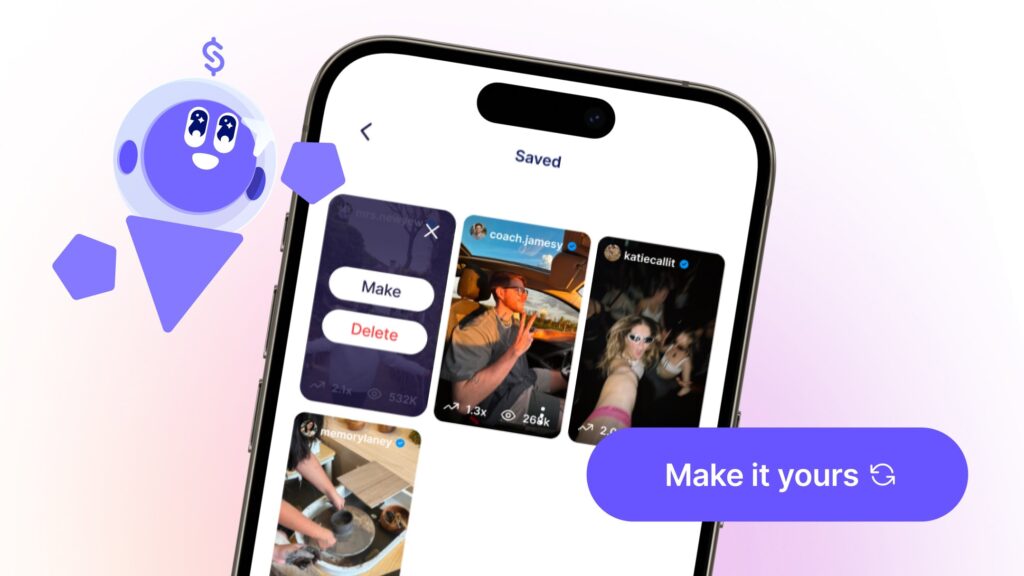
Once you’ve found a format that catches your eye, the next step is adapting it.
This is where Stanley’s “Make it yours” feature comes in.
Tell Stanley you want to put your own spin on a trend, and it’ll give you specific recommendations tailored to your brand, voice, and audience. The underlying structure of what’s working stays intact—but the message becomes unmistakably yours.
📌 Don’t have time to recreate the idea right now? Hit the save icon. You can revisit your “Saved” tab in the sidebar anytime—and never run out of content ideas again.
From Idea to Structured Content
Having an idea is one thing. Turning it into a polished post is another.
Once you’ve landed on a concept, Stanley can help you expand it into something you can actually publish. Tell it the format, the angle, and the feeling you want to leave your audience with—and it’ll generate:
- Hooks that stop the scroll
- Outlines for carousels and captions
- Scripts for Reels in your voice
- Weekly content directions built around what’s working for you
For Creators who post consistently, this is where the time-savings really stack up. Instead of bouncing between brainstorming, research, and execution, you move from inspiration to draft in one flow.
And over time, that speed removes one of the biggest barriers to consistency: running out of ideas.
Keep Your Instagram Content Ideas Flowing
You don’t need to use every idea in this guide. Start with a few that fit your niche, your voice, and the kind of content you actually want to create.
Maybe that’s educational carousels. Maybe quick-tip Reels. Maybe conversation-driven posts that spark real discussion in the comments.
The goal is simple: turn ideas into consistent content.
As you publish, you’ll naturally discover which formats resonate most with your audience. Those patterns will give you even more directions to explore—and Stanley will be there to help you spot them.
Because growing on Instagram rarely comes down to one breakout post. It comes from showing up consistently, with content that actually feels like you.
If you’re ready to stop ideating in the dark and start creating with a partner who already knows your brand, try Stanley free for 14 days. Your next breakthrough is just one prompt away.