TL;DR
An ebook is one of the most scalable digital products you can sell—you create it once, then sell it on repeat. Here’s how to write, design, and launch yours, then sell it straight from your link in bio with Stan Store. By the end of this guide, you’ll have everything you need to turn what you already know into income.
Whether you’re a seasoned Creator or just getting started, an ebook is one of the best ways to start making money online—without spending weeks building a course or trading time for money on coaching calls. You can turn everything you already know into a downloadable ebook you create once and sell forever.
An ebook takes a decent amount of work upfront, but once it’s done, you can sell it on repeat. And with an all-in-one Creator store like Stan Store, it’s never been easier to sell to your social audience.
In this guide, we’re diving into the step-by-step process of creating a successful ebook, plus how to sell it once it’s ready. By the end, you’ll have everything you need to turn what you know into an ebook people can’t wait to get their hands on.
Why You Should Create an Ebook
Selling digital products, like an ebook, helps you build an income stream (and audience) you own. Sure, Creators can make a lot from brand deals. But they’re inconsistent and outside of your control, so they’re not something you should solely build your business on.
Digital products put you in control over what you sell, what you charge, and when you get paid. And with tools like Stan Store, you can easily launch multiple offers and start selling directly from your link in bio.
So, why should you sell an ebook over other digital offers?
- High profit margins. Unlike brand deals, 1:1 coaching calls, or live online courses where you exchange time for money, there’s no limit on how many ebooks you can sell—and the profit margins are huge. You can sell an ebook for as little as $29/month (the cost of a Stan Store subscription) by using free design tools like Canva.
- Earn passive income. It takes time to create an ebook upfront, but once it’s done, you can sell it on repeat and earn true passive income. Of course, promoting your ebook takes time, too (it won’t sell itself!). However, you can automate a majority of your marketing by setting up Email Flows, Funnels, or Order Bumps to do the selling for you.
- Build authority in your niche. An ebook positions you as an authority in your space by bundling your expertise into a digital book people can dig deeper into in ways they can’t in a social media post. It also gives you more space to teach readers what you know and why you’re uniquely positioned to talk about it.
- Hook people on the value you can offer. The best ebooks intuitively sell readers on your other offers. You can cover a lot of information in your ebook, giving readers a stellar experience. Then, have complementary offers at the ready inside your Stan Store for those who want to go deeper into a specific area or get added 1:1 support.
- Diversify your revenue. No surprise, one of the biggest benefits of ebooks is that they give you an added income stream. More income streams = more stability and a stronger business in an ever-changing world. Ebooks are relatively easy to create and sell, so you’re not solely reliant on one source of revenue.
How to Create An Ebook
Creating an ebook might feel intimidating at first, but don’t worry—it’s easier than you’d think. To help you get started, we’re breaking down every step to create an ebook. Then we’ll show you how to sell it.
1. Determine your ebook focus and name
Before you dive into creating, you need to get clear on what your ebook will be about. Your ebook’s focus should solve a real problem for your target audience and be specific enough that people can easily understand what they’ll get out of it.
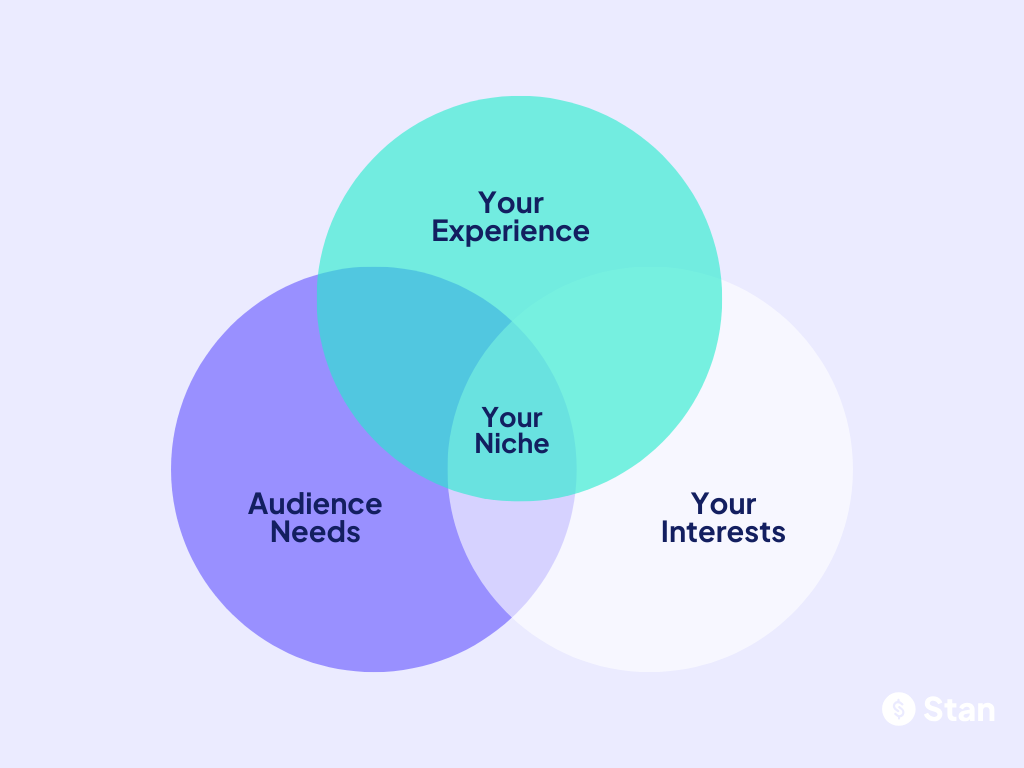
Take stock of your experience, interests, niche, and the unique value you can offer. Understanding where these intersect will help you figure out which topic to cover.
Poll your audience on what they want
If you’re struggling to decide what to write about, ask your audience:
- What they want help with
- What topics they’d be willing to pay for
- What formats they’d like—an ebook, checklists, templates
Too often, Creators pour all their energy into building an offer they *think* their audience wants without ever validating whether or not they actually do. Instead, invite your audience into what you’re building early and ask for their input.
Their responses might just spark a few new ebook topic ideas or validate the one you already have.
Consider your related offers and upsell opportunities
Will you make your ebook free or paid? And do you have additional existing offers you can tie into it?
Before launching, you’ll want to think about how your ebook fits into your business. You can use it as a lead magnet to attract your ideal customers, then sell them on a paid offer, like a course.
Or you can sell your ebook at a low- to mid-ticket price to give customers a taste of what they can learn from you, then upsell them to a higher-ticket offer like 1:1 coaching or an ongoing membership.
Whatever you choose to do, you’ll want to make sure that your ebook doesn’t feel random or disconnected from your brand.
For example, if you’re a fitness Creator who has built your audience on health tips and workouts, it would feel strange to offer a “Graphic Design 101” ebook suddenly.
Instead, you could sell ebooks like:
- The 30-Day fitness routine I swear by
- 20 healthy meal prep ideas for busy moms
- 10 quick workouts for people who hate the gym
Determine your ebook details
Once you’ve gotten clarity on what your ebook will be about and how it fits into the rest of your business, take some time to map out key details like:

- What will it include?
- Who’s it for?
- What will you name it?
You don’t have to have every detail locked in from the start—some aspects will evolve as you start creating. But it’s helpful to solidify the core details upfront so you know exactly what you’re offering and can start talking about it.
2. Organize your content into chapters
Next, think about how you want to organize your ebook. What information do people need to understand first? How do you want to group related topics together?
Open a Google, Notion, or Microsoft Word doc (or really any blank page) and start putting your thoughts on the page. Break your overarching topic into smaller, digestible chapters.
Try putting yourself in your readers’ mindset. Ask yourself:
- What do beginners need to know first to get the most out of my ebook?
- What subsections can I split my ebook into to keep it from being overwhelming?
Start by listing everything you want to include in your ebook. Then, group related topics into clear chapters with names. Finally, reorganize everything you plan on including so that it follows a logical flow.
3. Write your ebook content
Now, it’s time to turn the chapters you outlined into content your audience can learn from. Writing your ebook is the most time-consuming step of the process, so try splitting the work up and taking it one section at a time.
Maybe you start by listing the key takeaways you want readers to walk away with from each chapter. Then, go back through your notes to elaborate, share examples, and turn it into polished sections.
There’s no right or wrong way to write your ebook, so find the workflow that works for you. And just like everything else you create, you can make your ebook unmistakably yours by:
- Writing like you’re talking to your ideal reader
- Making it feel personal by using “you,” “your,” and “I”
- Sharing concrete personal examples
- Using the same phrases, branding, and tone you typically use in your social content
Don’t get too caught up in polishing your content as you’re writing it. It’s better to treat writing and editing as their own separate steps in the ebook creation process, so you can fully get your thoughts out on the page.
4. Proofread and edit
Once you’ve written each of your ebook chapters, take the time to proofread and edit your work. Your brand reputation is on the line, so you’ll want to make sure your final ebook draft is free of:
- Grammatical and spelling errors
- Formatting inconsistencies
- Broken links
- Duplicate sentences or phrases
- Missing information
As you’re reviewing the content, look for opportunities to make each lesson clearer and crisper. The content should be as long as necessary and as short as possible for your readers to get the most out of it.
You can use tools like Grammarly or Hemingway App to quickly fix errors and make your content even stronger.
5. Design and format your ebook
At this point, your ebook is nearly ready to start selling. All that’s left to do is turn it into a beautiful resource your audience can download or access as soon as they hit purchase.
First, decide whether you want your ebook to be a downloadable PDF or a living document (like a Notion page). This will dictate how you design and format it.
If you choose to create a PDF, you can use a user-friendly design tool like Canva to turn your ebook content into a stunning digital book.
Canva offers thousands of free pre-made templates you can customize to match your brand. And if you’re on a paid plan, you can create a custom brand kit that auto-saves your brand colors, logo, and fonts.
As you’re designing your book, make sure you:
- Lead with a book cover page that includes your ebook name.
- Use contrasting colors so it’s easy for people to read.
- Have clear chapter headings so readers can easily navigate your book.
- Add links to wherever readers can keep learning from you, whether it’s your social media pages, your Stan Store, or your own website.
- Don’t overcrowd pages. Leave enough space in between headers, paragraphs, and margins.
If you opt for a living ebook (an online resource you can update in real-time) instead of a download link or PDF, you can use a tool like Notion to format your ebook into organized sections.
Either way, you’ll want to design an ebook cover image and mockups you can use to promote it across your Stan Store, social posts, and email marketing channels.
6. Export or publish it
That’s it! Your ebook is ready to sell. All that’s left to do is export your ebook design to a PDF file or publish it within Canva, Notion, or wherever you chose to design it.

How to Sell Ebooks Online
Creating an ebook requires a lot of upfront time and effort. But with the right tool, selling it doesn’t have to. Here’s the fastest, most frictionless way to start selling your ebook online and making money right from your social profile.
1. Set up a Stan Store
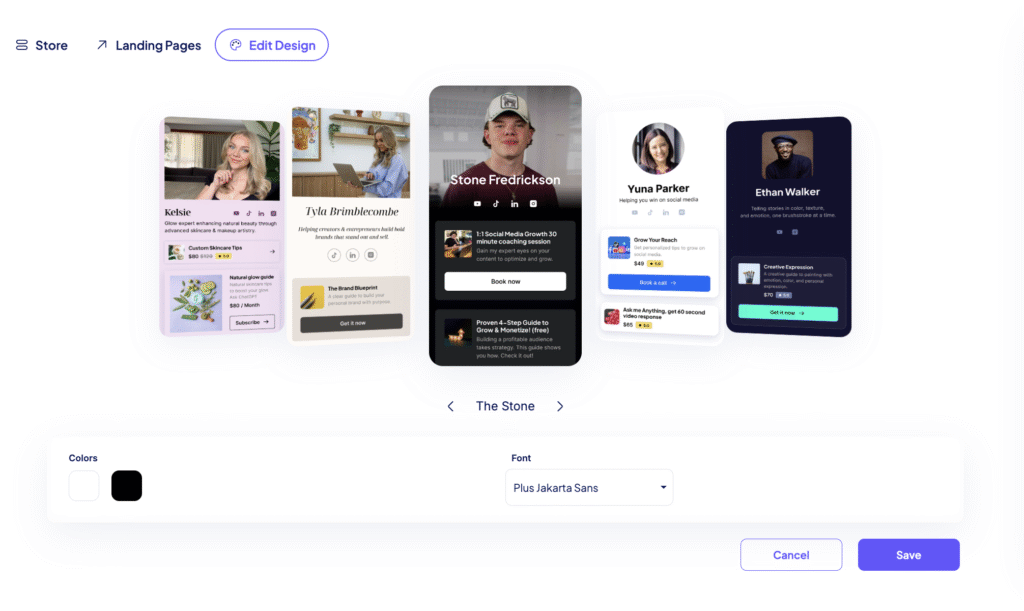
There’s a reason Stan Store is the go-to platform for over 80,000 Creators. We’ve helped Creator-Entrepreneurs like you earn over $600M, and we have everything you need to successfully launch, market, and sell your ebook in one place.
You can set up your store in a few minutes and sell virtually anything, from digital downloads to coaching calls, memberships, webinars, communities, and more. And unlike a traditional website, Stan Store is optimized for the way your followers actually shop—with a simple, mobile-first storefront and one-click checkout so they can buy your ebook as they’re scrolling their social apps.
2. Add a Digital Download Product
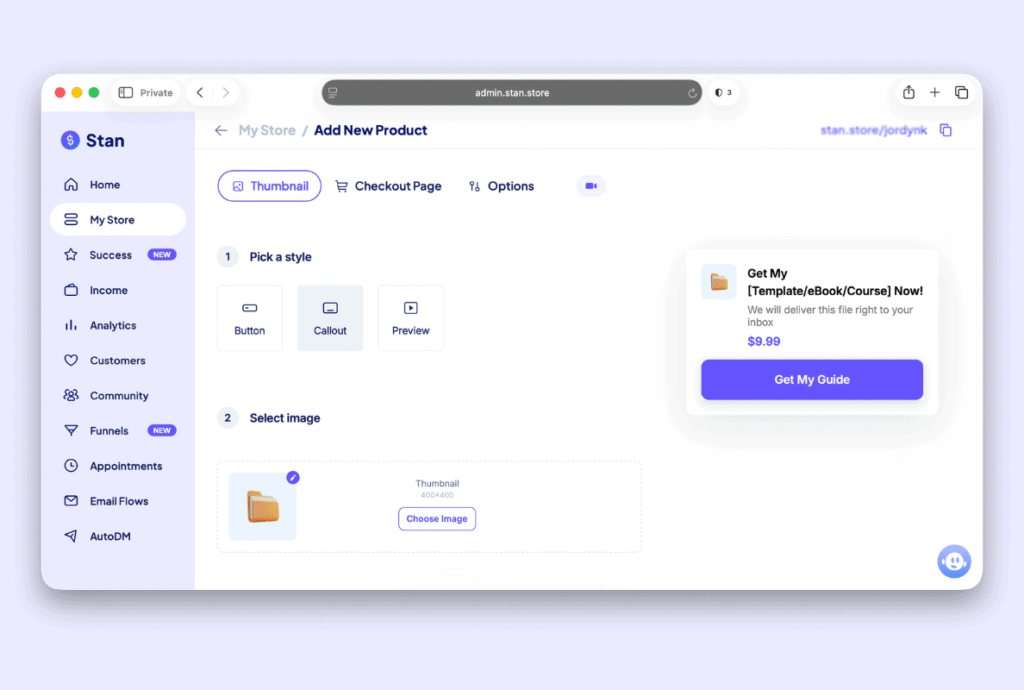
Once you’ve signed up for Stan Store, launching your ebook is easy. Just head to My Store, click Add Product, and choose the Digital Product option. Then, enter your ebook’s title and choose a thumbnail.
Click Next to start building your checkout page.
Customize your sales page
Your checkout page is where you sell your audience on your ebook, so take time to make sure it’s as compelling as possible. Use the description box to outline what your ebook is all about and write a compelling book description that hooks readers right away.
Make sure your description answers:
- Why does someone need this?
- What are they going to walk away with?
- What problem does it solve?
Then, tailor the call-to-action button to match your brand voice and create urgency.
Set your price
Once you’ve locked in your marketing copy, set your price. Stan Store defaults to $9.99, but you can set whatever price makes sense for your product. Usually, you’ll set your book pricing based on how much value it delivers, what it’s about, and how you’ve positioned it.
Ebook pricing ranges widely, with prices typically falling anywhere between $9.99 and $100. And in 2025, Creators earned $51 on average per ebook sale.
Collect customer info
When someone buys an ebook from your Stan Store, you’ll capture their name and email by default. But you can also add custom fields.
For example, if you want to find out what your customers’ interests are, you can add that as an additional field and even mark it as Required so they can’t checkout without filling it in.
Pro Tip: Custom intake fields aren’t just about capturing data—they’re about understanding your audience. What you learn from your customers here can directly shape your next offer or your messaging, so take advantage of the opportunity to collect key info about them.
Upload your ebook
For Stan Store to automatically deliver your ebook to customers, you’ll either need to upload your ebook file directly or redirect to a URL.
If your ebook is a downloadable file, like a PDF, you can upload the file and host it on your Stan Store. If it’s in a Google Doc, a Notion page, or a Canva link—anything that lives on the web—you can drop the URL instead.
Either way, your customer will automatically get access to your ebook the moment they check out.
3. Start an email waitlist
One of the best ways to drive ebook sales is by building buzz about it early. As soon as you’re in the process of creating an ebook, you should start collecting the emails of people who are interested in it. A waitlist keeps your future buyers engaged and ready to buy as soon as you launch.
You can easily start a waitlist on your Stan Store by heading to the My Store, pressing Add Product, and choosing the Collect Emails/Applications option. Give your waitlist a title and CTA, customize the opt-in fields you want to collect, and leave the Upload Attachment & Files section blank.

As you’re building your ebook, people can drop their email to be the first to know when it goes live. And you can work mentions about it into your content so followers know it’s on the way.
4. Build in public
Share your ebook progress and behind-the-scenes work with your audience. It draws people in and makes them feel like they’re part of your journey. Be candid about the messy middle and challenges you’re facing, not just the finished product—the cover options you’re torn between, the chapter that took you the longest to get right.
And don’t be afraid to ask your audience questions! Get their input on what they’d like to see. Create solutions for what they’re struggling with. And if you’re unsure about something, create an Instagram story asking for their opinions.
Building in public makes people root for the launch before it’s even here. And it creates a story around your offer that your audience feels invested in.
5. Create teaser videos

As you’re approaching your launch, turn key parts of your ebook into short videos or carousels. Use these to spark curiosity and show the value your ebook offers, then direct people to your waitlist.
Selling your book doesn’t have to feel forced. You can simply give your audience free value in your social posts and naturally weave mentions about your ebook in as a way to go deeper.
6. Give your waitlist early access
Before you push your ebook live on your store, reward those who joined your waitlist by giving them exclusive access to it first. Early access builds excitement, drives pre-launch sales, and can give you valuable feedback before you launch.
Email the people who signed up a few days before it goes live on your Stan Store—ideally with a small perk, like a discount code or free bonus. It makes them feel like insiders and pays them back for believing in you early.
And once they buy your book, you can even turn early customers’ responses into promotional content that builds hype for your main launch.
7. Launch your ebook
Finally, push your ebook live so anyone who visits your Stan Store can buy it. Post launch updates, celebrate milestones, and keep your ebook top-of-mind throughout launch week.
Don’t just share the link once and wait for sales to come in. Talk about your ebook all week from different angles and encourage your customers to share about it, too. Create social posts and email content that points your audience directly to the landing page where they can buy it.
Nina Made $150K+ in 30 Days—And You Could Too
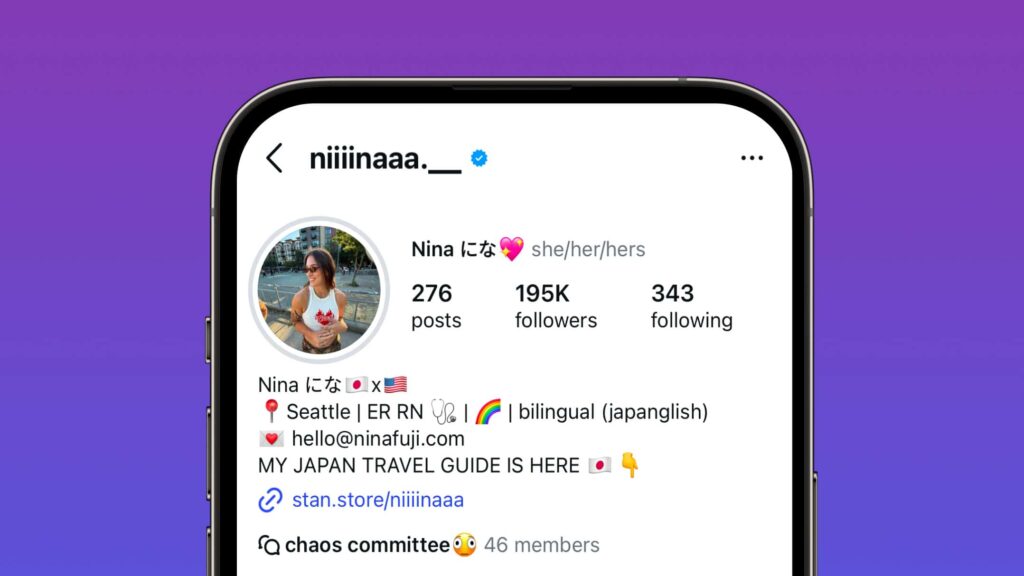
Nina Fuji is a prime example of what’s possible when you follow these steps. When she decided she was ready to create her first paid offer, she set up a Stan Store to capture leads as she was creating it. And in the weeks leading up to her launch, she talked about what she was building in her social posts.
Before launching her ebook, a Japan travel guide, she pre-launched to her waitlist to drive traffic and sales before it launched publicly. As those early customers shared positive feedback, she shared it in her content to get her audience primed and excited to buy as soon as it officially launched.
In her launch videos, she was super honest about why she’d created the ebook in the first place: to pay off over $150,000 in student loan debt. She set a goal to pay off all of her debt within one month of launching her guide.
And by following these steps, she was able to hit that goal—and even exceed it. Now, it’s your turn.
Launch Your Next Ebook With Stan Store
Creating an ebook is the hard part. Selling it shouldn’t be.
Stan Store gives you everything you need to launch in one place—so you can sell your ebook right from your link in bio, deliver it the second someone buys, and market it with waitlists, email, and upsells built to keep the sales rolling in.
No piecing together five different tools or transaction fees eating away at your revenue. Just one place to build, sell, and grow—while keeping 100% of every sale you make.
Ready to turn your expertise into income? Get 14 days of Stan Store free to launch your ebook and start earning.
FAQ: Selling Ebooks
Yes, ebooks are one of the few truly passive digital products you can sell. You create it once, then sell it on repeat, with no cap on what you can earn or how much you can scale. And although promoting offers takes time, you can automate most of it with tools like Stan Email Flows, Funnels, and Order Bumps that sell while you sleep.
It depends on the value you’re providing, its positioning, and what it’s about. Ebooks typically range anywhere from $9.99 to $100 each, with Creators earning $51 per ebook sale on average.
Many Creators start low-to-mid-ticket to give readers a taste of their work, then upsell them on a higher-ticket offer like coaching or a membership later.
You only need a few free or low-cost tools. You can write your ebook in Google Docs, Notion, or Microsoft Word, design it in a tool like Canva, and polish it with Grammarly or Hemingway. Then sell it on Stan Store, where you can host, deliver, and market it in one place—right from your link in bio.
The simplest way for Creators to sell online is with Stan Store. You can set up a store in minutes, add your ebook as a digital product, and share the link across your social profiles. And since your followers can buy it in one click while they’re scrolling their social apps, you’ll maximize conversions—turning followers into customers instantly.